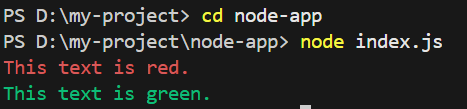
In Node.js, console font colors can be customized for better readability during debugging and logging using ANSI escape codes or third-party libraries.
Node.js does not provide native support for changing console font colors.
ANSI escape codes can be used to manually format colored output.
Third-party libraries like chalk and colors simplify color styling.
Colored logs improve clarity and debugging efficiency.
Using ANSI Escape Codes (No External Library)
In Node.js, console text color can be changed using ANSI escape codes, which apply terminal-level formatting without requiring external libraries.
Steps to Use ANSI Escape Codes:
Define the ANSI escape codes for different colors.
This method allows you to manually format text, but keep in mind that some terminals might not support or have disabled ANSI escape codes by default. If you encounter issues, consider using third-party libraries like chalk for cross-platform color formatting in the console.
Using chalk Library
chalk is a popular and flexible NodeJS library that allows you to style strings in the console. It provides a range of colors and styles to format your console output.