|
VOOZH | about |
|
VOOZH | about |
The DELETE method is an essential part of RESTful web services used to remove specific resources from a server. Whether you are building a simple API or a complex web application, knowing how to use this method effectively is key.
Here, we will explore how to Implement the DELETE method in Express.js using two different approaches direct routing and Express Router. By the end, you will be able to test and verify DELETE operations using postman with ease.
We will use the following approaches to test delete method:
In this approach, we use Express JS to handle nested routes and implement the DELETE method, providing a clear and straightforward organization of code.
Syntax:
app.delete('base URL', (req, res) => {
 // DELETE method logic for the base URL
})

app.delete('base URL/Nested URL', (req, res) => {
 // DELETE method logic for the nested URL
})
Example: Write the following code in server.js file.
This approach involves creating a base URL using Express JS Router, allowing for a cleaner structure and improved code organization.
Syntax:
const router = express.Router();

router.delete('/', (req, res) => {
 // DELETE method logic for the base URL
})

router.delete('/nested', (req, res) => {
 // DELETE method logic for the nested URL
})
Example: Write the following code in server.js file.
In this example, we'll create a basic API for managing a list of books.
Step 1: Initialize a Express Js project and install the required dependencies.
mkdir express-delete-example
cd express-delete-example
npm init -y
npm install express
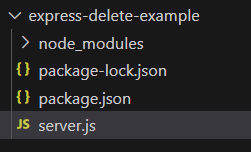
Project Structure:
👁 Screenshot-2024-01-05-190913The updated dependencies in package.json file will look like:
"dependencies": {
 "express": "^4.18.2"
}
Step 2: Create the main server file (e.g., server.js)
To start the server run the following command.
node server.js
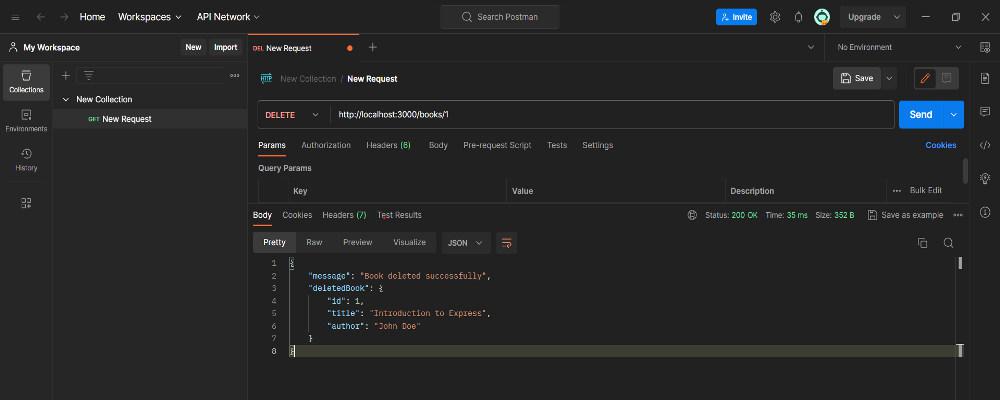
Step 3: You can test the DELETE method using Postman, for testing using postman:
Output: