|
VOOZH | about |
|
VOOZH | about |
Using ECMAScript Modules (ES Modules or ESM) in Node.js allows you to take advantage of modern JavaScript syntax for organizing and managing your code. ECMAScript Modules provide a more structured and standardized way to work with modules compared to CommonJS, which has been traditionally used in Node.js. Here’s a comprehensive guide on how to use ECMAScript Modules in Node.js:
Node.js treats JS code as CommonJS modules by default, However, the EcmaScript modules can be used instead of using the --experimental-modules flag.
The approaches to use EcmaScript modules in Node.js are:
Table of Content
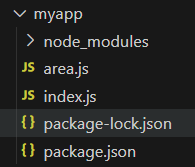
Step 1: Make a folder structure for the project.
mkdir myappStep 2: Navigate to the project directory
cd myappStep 3: Initialize the NodeJs project inside the myapp folder.
npm init -yAdd the below syntax and The updated dependencies in package.json file will look like:
"type" : "module" 👁 Imagepackage.json ConfigurationAlternatively, you can configure your package.json to use ECMAScript Modules globally by setting "type": "module":
Example: Implementation to show the use of EcmaScript modules in Node.js
// area.jsconst areaOfRectangle = (length, breadth) => {return length * breadth}export default areaOfRectangle
Node
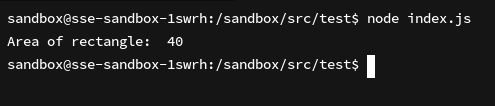
// index.jsimport areaOfRectangle from './area.js'console.log('Area of rectangle: ', areaOfRectangle(5, 8))
Output:
👁 Image.mjs File ExtensionCreate a module file with the .mjs extension. For example, create a file named module.mjs:
// module.mjs
export function greet(name) {
 return `Hello, ${name}!`;
}
import() syntax) for loading modules asynchronously.import and export keywords instead of require and module.exports.Using ECMAScript Modules in Node.js provides a modern and standardized approach to modular JavaScript development. By following the steps outlined above, you can start leveraging ECMAScript Modules in your Node.js applications to take advantage of improved code organization, module encapsulation, and support for modern JavaScript syntax.