|
VOOZH | about |
|
VOOZH | about |
Embedded JavaScript (EJS) is a simple templating language that helps us to generate HTML markup with plain JavaScript. It's commonly used with Node.js to create dynamic web pages. It also helps to incorporate JavaScript into HTML pages.
Step 1: Create a project folder i.e. foldername, move to it using the following command:
cd foldernameStep 2: Initialize Your Node.js Project
npm initStep 3: Install dependencies
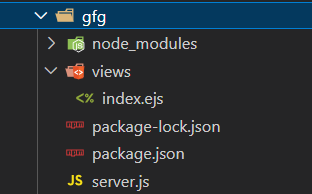
npm install express, ejsStep 4: After creating necessary files move to the folder using the following command:
cd foldername👁 Screenshot-2024-03-10-165612
The updated dependencies in package.json file will look like.
"dependencies": {
 "ejs": "^3.1.9",
 "express": "^4.18.3"
}
Example: In this example we will simply print "Hellow World" with hte help of EJS in Node.js. In this EJS file, <%= title %> and <%= message %> are placeholders that will be replaced with the values passed from the Node.js application.
Output: