|
VOOZH | about |
|
VOOZH | about |
Using serve-static files with routes in a Node.js application involves creating a server with Express, defining routes, and serving static files like HTML, CSS, JavaScript, images, etc. Here’s an article explaining how to use serve-static with routes in Node.js.
When building web applications with Node.js, you often need to serve static files like HTML, CSS, JavaScript, and images. The serve-static middleware in conjunction with Express is a popular way to achieve this. In this article, we’ll walk through the process of using serve-static to serve static files alongside custom routes in a Node.js application.
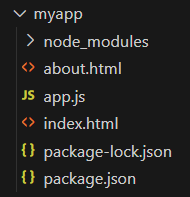
Step 1: Make a folder structure for the project.
mkdir myappStep 2: Navigate to the project directory
cd myappStep 3: Initialize the NodeJs project inside the myapp folder.
npm init -yTo use routes with the server-static files:
http to create the server and fs to handle file operations, defining the server port for connections.readAndServe function to read files asynchronously and send the content as an HTTP response.http.createServer to check the request URL and call readAndServe with the appropriate file path for each route.server.listen on a specified port to begin listening for incoming requests and log a message confirming the server is running.index.html and about.html with basic content and navigation links, placing them in the same directory as the server script.Example: Implementation to use routes with serve-static files in NodeJs.
Output : The static files specified for different paths will be served accordingly.
👁 Image