|
VOOZH | about |
|
VOOZH | about |
When working with MongoDB and Mongoose in Node.js, handling multiple database operations one by one can be slow and inefficient. That’s where the Model.bulkWrite() method comes in handy. This powerful API lets you execute multiple write operations (insert, update, delete, replace) in a single command, which improves performance and reduces network overhead.
In this article, we’ll explore the Mongoose bulkWrite() API with practical examples, setup steps, and best practices to help us boost your application’s database interaction speed.
Model.bulkWrite() in Mongoose?The Model.bulkWrite() method of the Mongoose API is used to perform multiple operations in one command. It can insert multiple documents, update one or multiple documents, replace documents, delete documents in one single command. This is faster in performance than multiple independent create commands.
Syntax:
Model.bulkWrite(operations, options, callback)
Step 1: Create a Node.js application using the following command:
npm initStep 2: After creating the NodeJS application, Install the required module using the following command:
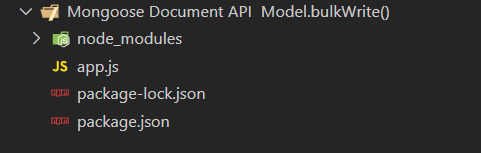
npm install mongooseProject Structure: The project structure will look like this:
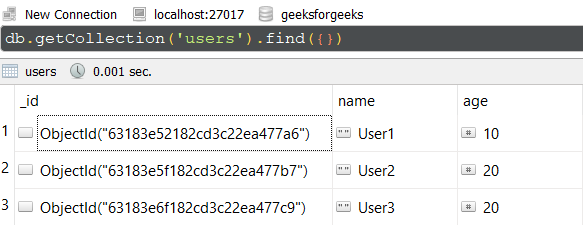
Database Structure: The database structure will look like this, the following documents are present in the collection.
bulkWrite() for Insert and Update OperationsIn this example, We have established a database connection using mongoose and defined model over userSchema, having two columns or fields "name" and "age". At the end, we are using bulkWrite() method on the User model which is having various operations like insertOne, UpdateOne.
We are providing these as an array of objects as the first parameter to bulkWrite() method. In this example, we have inserted one new document and updated the existing document. Write down the below code in the app.js file:
// Require mongoose module
const mongoose = require("mongoose");

// Set Up the Database connection
mongoose.connect("mongodb://localhost:27017/geeksforgeeks", {
 useNewUrlParser: true,
 useUnifiedTopology: true,
});

const userSchema = new mongoose.Schema({
 name: String,
 age: Number,
});

// Defining userSchema model
const User = mongoose.model("User", userSchema);
User.bulkWrite([
 {
 insertOne: {
 document: {
 name: "User4",
 age: 30,
 },
 },
 },
 {
 updateOne: {
 filter: { name: "User1" },
 update: { name: "User1 Updated" },
 },
 },
]).then((result) => {
 console.log(result);
});
Steps to run the program: To run the application execute the below command from the root directory of the project:
node app.jsOutput:
BulkWriteResult {
 result: {
 ok: 1,
 writeErrors: [],
 writeConcernErrors: [],
 insertedIds: [ [Object] ],
 nInserted: 1,
 nUpserted: 0,
 nMatched: 1,
 nModified: 1,
 nRemoved: 0,
 upserted: []
 }
}
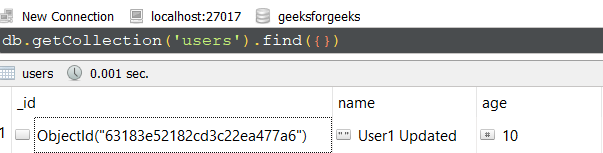
GUI Representation of the Database using Robo3T GUI tool:
Explanation:
insertOne adds a new user with name "User4".updateOne searches for a user named "User1" and updates the name to "User1 Updated".bulkWrite() for Delete OperationsIn this example, we are performing deleteOne and deleteMany operation using bulkWrite() method. Below is the documents present in collection before executing the command.
Write down the below code in the app.js file:
// Require mongoose module
const mongoose = require("mongoose");

// Set Up the Database connection
mongoose.connect("mongodb://localhost:27017/geeksforgeeks", {
 useNewUrlParser: true,
 useUnifiedTopology: true,
});
const userSchema = new mongoose.Schema({
 name: String,
 age: Number,
});

// Defining userSchema model
const User = mongoose.model("User", userSchema);

User.bulkWrite([
 {
 deleteOne: {
 filter: { name: "User4" }
 }
 },
 {
 deleteMany: {
 filter: { age: 20 },
 }
 },
]).then((result) => {
 console.log(result);
});
Steps to run the program: To run the application execute the below command from the root directory of the project:
node app.jsOutput:
BulkWriteResult {
 result: {
 ok: 1,
 writeErrors: [],
 writeConcernErrors: [],
 insertedIds: [],
 nInserted: 0,
 nUpserted: 0,
 nMatched: 0,
 nModified: 0,
 nRemoved: 3,
 upserted: []
 }
}
GUI Representation of the Database using Robo3T GUI tool:
Explanation:
deleteOne removes the user document with name "User4".deleteMany removes all users with age 20.bulkWrite().catch() or try-catch in async functions.bulkWrite() when you have multiple operations to perform on the same collection to improve performance.BulkWriteResult to audit operations and handle partial failures.The Mongoose Model.bulkWrite() API is a valuable tool for optimizing MongoDB write-heavy applications. By batching multiple operations inserts, updates, deletes into a single command, you reduce the overhead of multiple network calls and improve throughput. Whether you are building a scalable backend or handling large datasets, mastering bulkWrite() will help make your application faster and more efficient.