|
VOOZH | about |
|
VOOZH | about |
The Model.deleteOne() method of the Mongoose API is used to delete a document from the collection. We can provide an object of the field to the deleteOne() and can be executed on the model object. It will delete the first document that matches the condition from the collection.
Syntax:
Model.deleteOne()
Parameters: The Model.deleteOne() method accepts three parameters:
Return Value: The Model.deleteOne() function returns a promise. The result contains an object with the property name deletedCount indicating the number of documents deleted.
Setting up Node.js application:
Step 1: Create a Node.js application using the following command:
npm init
Step 2: After creating the NodeJS application, Install the required module using the following command:
npm install mongoose
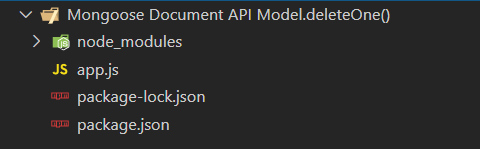
Project Structure: The project structure will look like this:
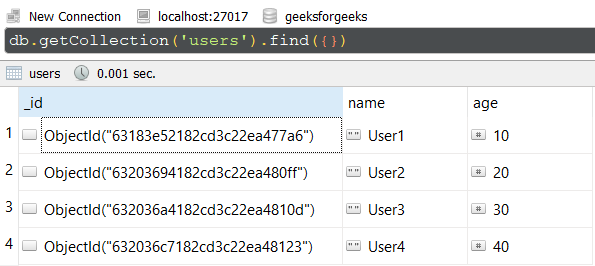
Database Structure: The database structure will look like this, the following documents are present in the collection.
Example 1: In this example, We have established a database connection using mongoose and defined model over userSchema, having two columns or fields "name" and "age". In the end, we are using deleteOne() method on the User model which will delete first document from the collection that matches the condition. In this example, we are deleting a document which has "User1" as value to "name" field.
Step to run the program: To run the application execute the below command from the root directory of the project:
node app.js
Output:
{ acknowledged: true, deletedCount: 1 }
GUI Representation of the Database using Robo3T GUI tool:
Example 2: In this example, we are deleting a document that has "40" as the value to the "age" field.
Step to run the program: To run the application execute the below command from the root directory of the project:
node app.js
Output:
{ acknowledged: true, deletedCount: 1 }
GUI Representation of the Database using Robo3T GUI tool:
Reference: https://mongoosejs.com/docs/api/model.html#model_Model-deleteOne