|
VOOZH | about |
|
VOOZH | about |
Mongoose, a well-known Object Data Modeling (ODM) library for MongoDB and Node.js. It gives a convenient method of dealing with MongoDB data. One of its critical APIs is the Model.exists() API that facilitates the efficient identification of whether a document exists in a collection by certain conditions. This article delves into the Model.exists() method, its syntax, usage, and examples and assist you in using it efficiently within your Node.js projects.
Model.exists() in Mongoose?The Model.exists() function in Mongoose provides a function to determine whether there is a minimum of one document in the database that satisfies a certain filter criterion. It serves as a quick means of confirming the presence of documents without retrieving the full document, hence more efficient compared to other functions such as findOne() or find(). The outcome of this approach is a promise that will resolve to an object with the _id of the matching document in case of a match or to null in case of no match
Syntax:
Model.exists()
Parameters:
Returns:
To demonstrate how Model.exists() works, follow these steps to set up a simple Mongoose application.
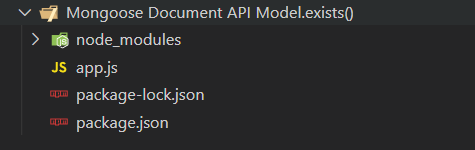
Create a Node.js application using the following command:
npm initAfter creating the NodeJS application, Install the required module using the following command:
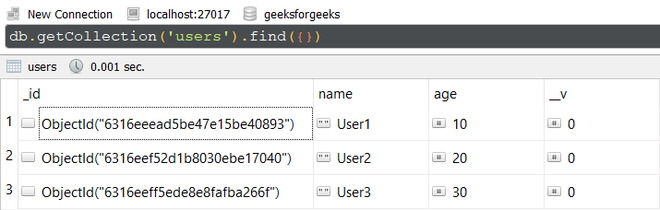
npm install mongooseDatabase Structure: The database structure will look like this, the following documents are present in the collection.
Model.exists() to Find a DocumentIn this example, We have established a database connection using mongoose and defined model over userSchema, having two columns or fields "name" and "age". In the end, we are using exists() method on the User model to get the "_id" of the document where the value of "age" field is "20".
app.js:
// Require mongoose module
const mongoose = require('mongoose');

// Set Up the Database connection
mongoose.connect(
 'mongodb://localhost:27017/geeksforgeeks', {
 useNewUrlParser: true,
 useUnifiedTopology: true
})

const userSchema = new mongoose.Schema(
 { name: String, age: Number}
)

// Defining userSchema model
const User = mongoose.model('User', userSchema);
User.exists({age: 20}).then(result => {
 console.log(result)
})
Step to run the program: To run the application execute the below command from the root directory of the project:
node app.jsOutput:
{ _id: new ObjectId("6316eef52d1b8030ebe17040") }Explanation: The User.exists({ age: 20 }) query checks if there is a document where the age field is equal to 20. If a match is found, it returns the _id of the document; if not, it returns null.
Model.exists() with Non-Existing DataIn this example, we are providing such value to the "age" field for which the document does not exist in the database. So, in the output, we will get a "null" value.
app.js:
// Require mongoose module
const mongoose = require('mongoose');

// Set Up the Database connection
mongoose.connect(
 'mongodb://localhost:27017/geeksforgeeks', {
 useNewUrlParser: true,
 useUnifiedTopology: true
})

const userSchema = new mongoose.Schema(
 { name: String, age: Number}
)

// Defining userSchema model
const User = mongoose.model('User', userSchema);
User.exists({age: 50}).then(result => {
 console.log(result)
})
Step to run the program: To run the application execute the below command from the root directory of the project:
node app.jsOutput:
nullExplanation: The User.exists({ age: 50 }) query checks if there is a document with age equal to 50. Since no document matches the filter, the result is null
The Model.exists() method is a quick, effective feature in Mongoose for determining whether documents exist in a MongoDB collection under a filter criterion. As opposed to other methods such as findOne() or find(), exists() is optimized in terms of performance because it only returns the _id of the corresponding document, not the full document. This would be especially convenient if you only want to check if a document exists without necessarily having to fetch its contents.