|
VOOZH | about |
|
VOOZH | about |
The Model.prototype.modelName property of the Mongoose API is used to return the name of the model.
Syntax:
Model.prototype.modelName.db
Returns: The Model.prototype.modelName property returns the name of the model.
Setting up Node.js application:
Step 1: Create a Node.js application using the following command:
npm init
Step 2: After creating the NodeJS application, Install the required module using the following command:
npm install mongoose
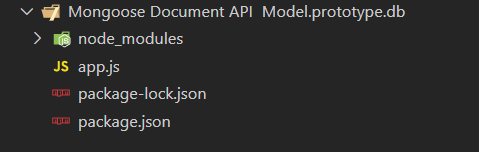
Project Structure: The project structure will look like this:
Example 1: In this example, we have established a database connection using mongoose and defined model over userSchema, having two columns or fields “name” and “age”. In the end, we are using the modelName property on the User model which will return the name of the model.
Steps to run the program: To run the application execute the below command from the root directory of the project:
node app.js
Output:
Model Name is: User
Example 2: In this example, we have established a database connection using mongoose and defined model over studentSchema, having three columns or fields “name”, “father_name”, and “mother_name”. In the end, we are using db property on the Student model which will return the connections that are being used by the Student model.
Steps to run the program: To run the application execute the below command from the root directory of the project:
node app.js
Output:
Model Name is: Student
Reference: https://mongoosejs.com/docs/api/model.html#model_Model-modelName