VOOZH about

URL: https://www.geeksforgeeks.org/node-js/movie-recommendation-system-with-node-and-express-js/

⇱ Movie Recommendation System with Node and Express.js - GeeksforGeeks


  • Courses
  • Tutorials
  • Interview Prep

Movie Recommendation System with Node and Express.js

Last Updated : 23 Jul, 2025

Building a movie recommendation system with Node and Express will help you create personalized suggestions and recommendations according to the genre you selected. To generate the recommendation OpenAI API is used. In this article, you will see the step-wise guide to build a Movie recommendation system.

Output Preview: Let us have a look at how the final output will look like.

👁 2-(online-video-cuttercom)

Prerequisites :

Approach to create Movie Recommendation System:

  • Input processing: Analyze user preferences and input using the OpenAI API.
  • Personalized Recommendations: Utilize the OpenAI API to generate movie recommendations based on user preferences.
  • Responsive Design: Ensure the application is responsive across various devices.
  • User interface: Provide a user-friendly interface to interact with the system.
  • Error Handling: Implement robust error handling to enhance user experience

Steps to create the project:

Step 1: Set Up Your Development Environment:

  • Install Node.js: If you haven't already, download and install Node.js from the official website (https://nodejs.org/en). Follow the installation instructions for your operating system.
  • Verify Installation: After installation, open a terminal (or command prompt) and run node -v and npm -v to ensure Node.js and npm (Node Package Manager) are installed correctly.

Step 2: Set Up Project Structure:

Create a new directory for your project and navigate into it:

mkdir movie-recommendation
cd movie-recommendation

Step 3: Install Dependencies:

You'll need to install Express.js and Axios for making HTTP requests:

npm init -y
npm install express axios dotenv

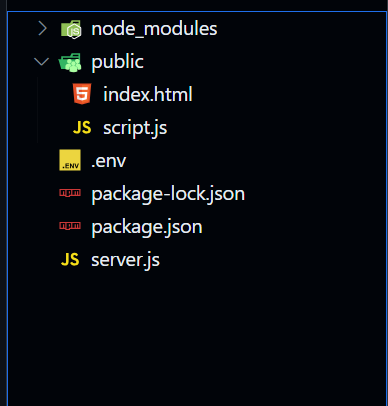
Folder Structure:

👁 Screenshot-2024-02-29-130058

The updated Dependencies in package.json file will look like:

"dependencies": {
"axios": "^1.6.7",
"dotenv": "^16.4.5",
"express": "^4.18.3"
}

Example: Create the files as suggested in folder structure and add the following code.

.env file: This file will contain your environment variables, including your OpenAI API key.

PORT=3000
OPENAI_API_KEY=your_openai_api_key_here

Run the following command to start the server:

node server.js

Output:

👁 2-(online-video-cuttercom)

Comment

Explore