VOOZH about

URL: https://www.geeksforgeeks.org/node-js/node-js-building-simple-rest-api-in-express/

⇱ Node.js Building simple REST API in express - GeeksforGeeks


  • Courses
  • Tutorials
  • Interview Prep

Node.js Building simple REST API in express

Last Updated : 11 Jul, 2025

Let's have a brief introduction about the Express framework before starting the code section:
Express: It is an open-source NodeJs web application framework designed to develop websites, web applications, and APIs in a pretty easier way. 
Express helps us to handle different HTTP requests at specific routes.
As it is NodeJs web framework so make sure that NodeJs has been installed on our system.


For verifying type the following command in the terminal: 

node -v

It will show the installed version of NodeJs to our system as shown in the below screenshot.

👁 Image
  • STEP-1: 
    Create a separate folder and with the help of a terminal or command prompt navigate to this folder: 
     
  • STEP-2: 
    Create package.json by typing the following command in the terminal: 
     
npm init -y

For knowing more about package.json click here
 

  • STEP-3: 
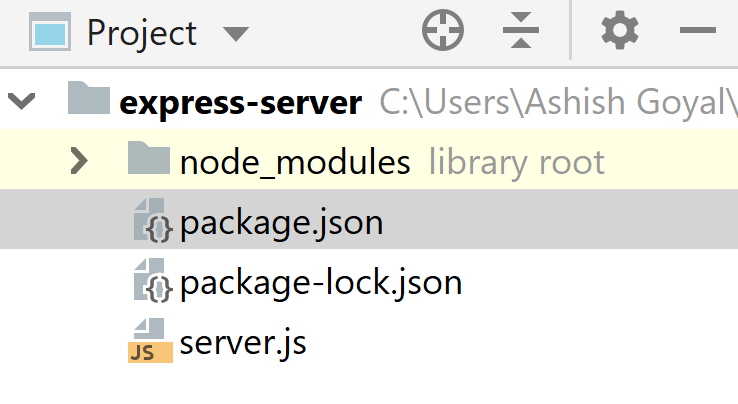
    Create a file named server.js at the root of the project. 
    Now, our folder structure will be as shown in the screenshot below: 
     
👁 Image
  • STEP-4: 
    Start server by typing the following command in the terminal: 
     
node server.js
👁 Image
  • STEP-5: 
    Open the browser and type http://localhost:8000 and we will get the following response.
     👁 Image
    We are getting Cannot GET / response as we are trying to access/route to the server and there is nothing mounted to that particular route. 
     
  • STEP-6: Handing the route to the server 
    Handle the root route of the server by sending something back to it and adding the following code to the server.js
     
app.get('/', function (req, res) {
 res.send('we are at the root route of our server');
})

Now, restart the server by typing the following command :

node server.js
Comment
Article Tags:

Explore