VOOZH about

URL: https://www.geeksforgeeks.org/node-js/node-js-callback-concept/

⇱ Node Callback Concept - GeeksforGeeks


  • Courses
  • Tutorials
  • Interview Prep

Node Callback Concept

Last Updated : 25 Apr, 2026

In Node.js, callbacks enable asynchronous, non-blocking execution, while methods like readFileSync() perform blocking operations. The fs module provides both synchronous and asynchronous approaches to handle file system tasks.

  • Callback Function: Executes after a task completes, enabling non-blocking processing.
  • Improves Scalability: Allows handling multiple requests without waiting for operations to finish.
  • readFileSync(): A synchronous method that blocks execution until the file is fully read.
  • Asynchronous Methods: Continue execution while file operations run in the background.

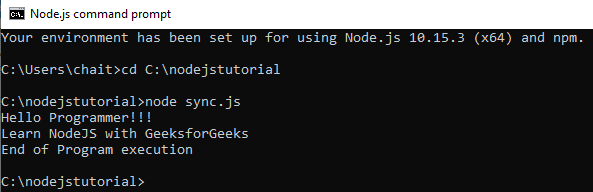
Example: Code for reading a file synchronously (blocking code) in Nodejs. Create a text file inputfile1.txt with the following content:

Hello Programmer!!!
Learn NodeJS with GeeksforGeeks

Output:

👁 Image

  • The fs library is used to perform file system operations in Node.js.
  • The asynchronous readFile() function allows the program to continue execution while the file is being read in the background.
  • A callback function is executed after the file-reading operation is completed.

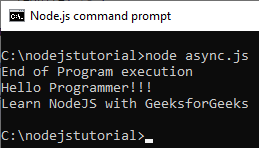
Example : Code for reading a file asynchronously (non-blocking code) in Nodejs. Create a text file inputfile1.txt with the following content.

Hello Programmer!!!
Learn NodeJS with GeeksforGeeks

Output:


👁 Image
  • The fs.readFile() function reads the file asynchronously (non-blocking).
  • The program does not wait for the file to be read.
  • "End of Program execution" is printed first.
  • The file content is printed later when the callback runs.
Comment
Article Tags:

Explore