VOOZH about

URL: https://www.geeksforgeeks.org/node-js/node-js-stringdecoder-write-method/

⇱ Node.js stringDecoder.write() Method - GeeksforGeeks


  • Courses
  • Tutorials
  • Interview Prep

Node.js stringDecoder.write() Method

Last Updated : 3 Jun, 2026

The stringDecoder.write() method in Node.js is used to decode data from a Buffer, TypedArray, or DataView into a string. It helps correctly process character data by handling incomplete multibyte characters across multiple chunks.

  • Stores incomplete multibyte characters in an internal buffer.
  • Uses the stored bytes in subsequent write() or end() calls.
  • Commonly used when reading data from streams in chunks.

Syntax:

stringDecoder.write( buffer )

where,

  • buffer: It is a Buffer, TypedArray or DataView that contains the bytes that have to be decoded.

Return Value: It returns a string which is decoded from the given buffer.

Example 1:

In this code, A StringDecoder object is created with UTF-8 encoding to decode data stored in a Buffer. The write() method converts the buffer content into a readable string and returns the decoded result.

Output:

👁 Screenshot-2026-06-02-163757

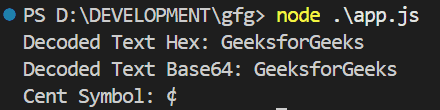
Example 2:

In this code, The StringDecoder object is used to decode data stored in buffers with different encodings. It converts hexadecimal, Base64, and byte-based buffer data into readable UTF-8 text and symbols.

Output:

👁 Screenshot-2026-06-02-163645

Use cases of stringDecoder.write()

  • Reading text files chunk by chunk without corrupting characters.
  • Processing incoming data from sockets and network connections.
  • Decoding hexadecimal and Base64 encoded buffer data.
  • Displaying human-readable text from binary data sources.
  • Handling Unicode characters that may be split across data chunks.

Reference: https://nodejs.org/api/string_decoder.html#string_decoder_stringdecoder_write_buffer

Comment
Article Tags:

Explore