|
VOOZH | about |
|
VOOZH | about |
The npm doctor command is one of the features available in npm with the primary purpose of performing a health check on your npm environment, it evaluates if the general condition of the npm that is being used is in accordance with the general norms.
npm doctorThese are the following topics that we are going to discuss:
npm doctor runs a set of diagnostics to make sure your npm installation is performing well, it examines some of the key elements required for npm to efficiently manage JavaScript packages-
registry.npmjs.com) or another custom registry should be reachable.node_modules directories must exist and be writable by the current user.If any of these conditions are not met and npm does not work as expected, npm doctor command helps diagnose such issues.
npm doctor command checks if your npm registry is reachable by hitting a special endpoint in the registry, this can also be manually tested by using the npm ping command-
npm pingThis check ensures that configured registry (viewable with npm config get registry) is accessible, if registry check fails, it could indicate a proxy issue or a need for IT assistance to access registry over HTTPS.
It is important to make sure you are using latest version of npm, although NodeJS may ship with a specific npm version also we recommend using latest stable version of npm to avoid bugs and issues.
npm -vMost users are encouraged by the npm team to use the current Long-Term Support or LTS version purchased from the NodeJS site, however a project may need specific scenarios that might call for an older or a more bleeding-edge version.
node -vIf you're working with private package registries, it's essential to ensure that your project is pointing to correct registry, this check helps confirm if you’re using the default npm registry (https://registry.npmjs.org/) or a custom one.
npm config get registryGit is necessary for many npm operations, especially when installing packages from Git repositories also this check ensures that Git is correctly installed and accessible via system's PATH.
which gitnpm needs certain permissions to function correctly,npm doctor checks-
node_modules are accessible and writable if running npm within a project directory.To ensure that packages stored in your npm cache are not corrupted, npm doctor verifies correctness of the totals, if a damaged package is detected It is recommended to run the following command to clear your cache-
npm cache clean -fBy default, npm points to official registry at https://registry.npmjs.org/, you can customize registry if needed-
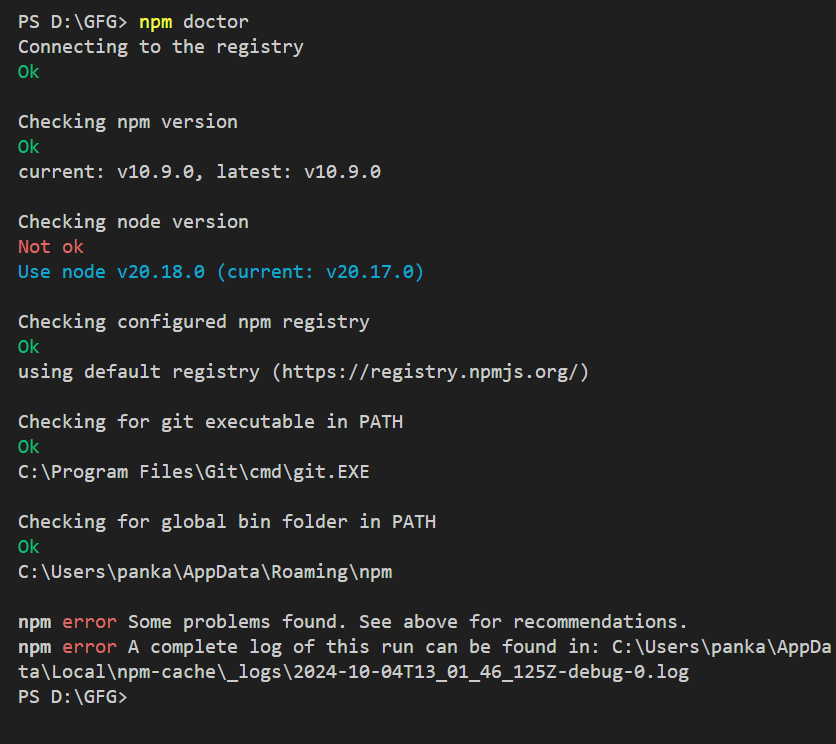
npm config get registry"https://registry.npmjs.org/"Run the following command to check your npm environment.
npm doctorOutput: