|
VOOZH | about |
|
VOOZH | about |
In JavaScript, package managers are crucial in managing project dependencies efficiently. Two of the most popular package managers are npm (Node Package Manager) and pnpm (Performant npm). While both serve the same fundamental purpose of installing and managing packages they differ significantly in their approaches, performance, and features.
This article will explore the differences between the pnpm and npm including the installation, features, examples and a comparison table to help developers make informed choices.
Table of Content
The pnpm is a fast disk space-efficient package manager for JavaScript projects. It optimizes the installation process by using a unique approach to the dependency management. Instead of creating a separate copy of each package for every project pnpm stores all packages in the global content-addressable store creating symlinks in the project directory. This reduces redundancy and speeds up installations.
To install pnpm we can use npm or curl:
Using npm:
npm install -g pnpmUsing curl:
curl -L https://unpkg.com/@pnpm/self-installer@2.2.1/install.js | nodeExample: Here’s a simple example of using the pnpm to create a new project and install a package.
Step 1: Create a new project directory and navigate into it:
mkdir my-pnpm-project
cd my-pnpm-project
Step 2: Initialize a new project:
pnpm initStep 3: Install a package:
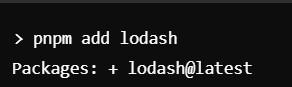
pnpm add lodashOutput:
The npm (Node Package Manager) is the default package manager for the Node.js. It provides a command-line interface for the managing JavaScript libraries and frameworks enabling the developers to install, update and manage dependencies in their projects. npm is widely used and has a large repository of the packages.
The npm is included with Node.js so to install npm we need to install Node.js. After installation we can check the npm version:
npm -vExample: Here’s a simple example of using the npm to create a new project and install a package.
Step 1: Create a new project directory and navigate into it:
mkdir my-npm-project
cd my-npm-project
Step 2: Initialize a new project:
npm init -yStep 3: Install a package:
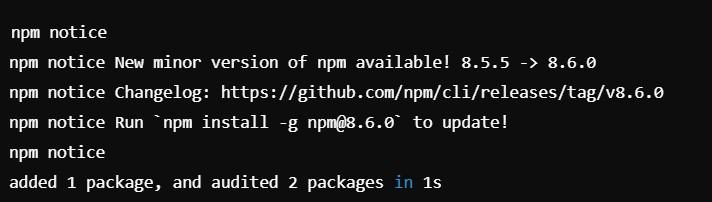
npm installOutput:
Characteristics | pnpm | npm |
|---|---|---|
Installation Speed | Faster due to caching and symlinks | Slower for large projects |
Disk Space Usage | Efficient using the symlinks | Less efficient, installs duplicates |
Dependency Resolution | Strict and avoids version conflicts | More flexible may lead to conflicts |
Workspaces Support | Built-in | Supported with the additional configuration |
Package Management | Uses content-addressable storage | Traditional flat node_modules structure |
Ecosystem | Growing but smaller than npm | Largest ecosystem of the packages |
Both pnpm and npm are valuable tools for the managing JavaScript packages. While npm is widely recognized and offers a vast ecosystem pnpm provides the more efficient and performance-oriented approach to the dependency management. Developers should consider their project's needs such as the installation speed, disk space usage and dependency resolution when choosing between these two package managers. For projects with the many dependencies or those that require strict version control pnpm may be the better choice.