|
VOOZH | about |
|
VOOZH | about |
CLI is a very powerful tool for developers. We will be learning how to create a simple Todo List application for command line. We have seen TodoList as a beginner project in web development and android development but a CLI app is something we don't often hear about.
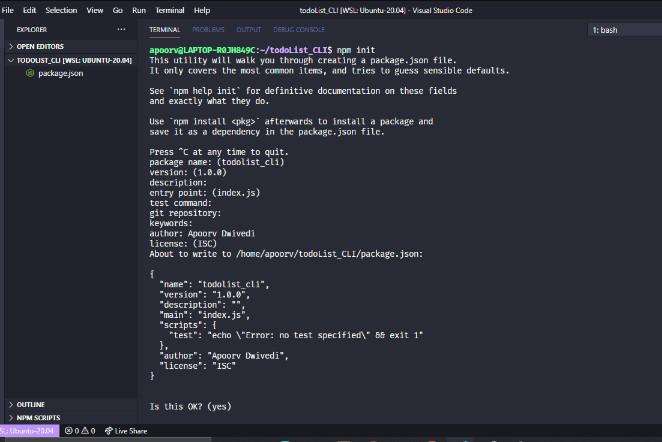
Create a new directory by mkdir <dir-name> and initiate an empty node project by cd into the directory and type the command npm init.
Note: We won't be using any third-party module in this project.
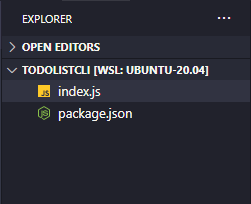
Project Directory: Now the project directory should consist of two files, package.json, and index.js as shown below:
👁 ImageSome basic functionalities in our Todo List App will be the following:
Create an index.js file and write down the following code into it
Explanation: We will be writing todo Tasks in a file called todo.txt and when they will be completed they will be erased from todo.txt and will be written in done.txt. The report will show how many todo has been completed and how many are left. To start with, we will import the fs module which will give us access to the file system.
Then, we will get the arguments passed using process.argv and store them in a variable named args. The process.argv returns an array in which there is the location of node modules, current working directory, and further arguments passed. We will retrieve the cwd by removing the name of the file.
Next, we will check if todo.txt and done.txt already exist in cwd, if not we will create them as shown below:
Now we will create different functions for displaying usage, adding todo, deleting todo, etc. They will be called based on the arguments passed.
It will display the usage format. It will be called when help is passed as an argument or when no argument is passed.
It will read the data from todo.txt and display them with a corresponding number. Most Recent is displayed on the top with the largest number.
It will read the content from todo.txt, add the new todo, and then rewrite it in todo.txt.
Note: Since we don't have the functionality to set the pointer position in the file while writing and reading files in JavaScript, so every time we add new data we will have to read the data, make the modifications, and then re-write it back.
It will read the data from todo.txt, remove the corresponding task, and re-write the data back in a file.
This function will read data from todo.txt, split it into an array, store the task to be marked as done, delete it from todo.txt, re-write the data back to todo.txt. Now we will write the deleted task we stored along with the current date in done.txt.
It will read data from todo.txt and done.txt, calculate the number of tasks in each and display how many tasks are completed and how many are pending.
Now Since we have created all the functions, Now we will just put a switch statement and call functions based on arguments passed.
Filename: index.js Our final index.js file will look like the following:
Step to run the application:
Run the index.js file using the following command:
node index.jsOutput: