|
VOOZH | about |
|
VOOZH | about |
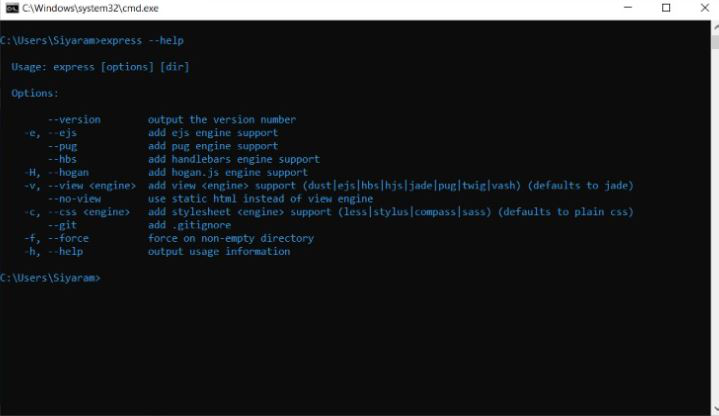
Express Generator is a Node.js Framework like ExpressJS which is used to create express Applications easily and quickly. It acts as a tool for generating express applications. In this article, we will discuss the Express Generator.
Express Generator is a command-line tool for quickly creating an Express.js application skeleton, providing a structured foundation with pre-configured settings, middleware, and directories, enabling rapid development of web applications.
To install this tool on your local machine globally (you can use it anywhere on your Machine), run the below command on your command Line/terminal:
Note: You should have installed Node and Express before using Express-generator on your machine.
npm install express-generator -gUpdated dependency
"dependencies": {
 "express-generator": "^4.16.1",
}
For Creating a Simple Express.js Web Application, Open command prompt/Terminal in your local fileSystem and execute the below command.
Syntax:
express <Your-ExpressJsApplication-Name>Example:
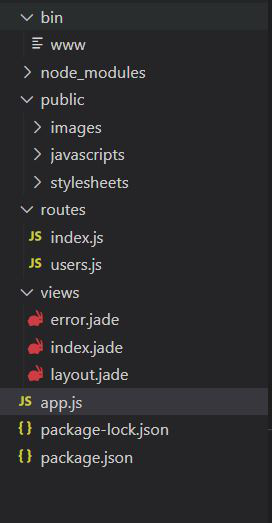
express ExpressWebAppAfter creating the express-generator the structure looks like given below:
The updated dependencies in package.json file:
"dependencies": {
 "cookie-parser": "^1.4.6",
 "express": "^4.19.2",
 "http-errors": "^2.0.0",
 "morgan": "^1.10.0",
 "path": "^0.12.7"
}
Example: app.js file is the main file in the express-generator where most of the user-defined routes are handled and also provides various default imported modules like cookie-parser, morgan, etc. That helps to create an express server in an efficient manner.
Below is the default app.js file structure that is generated by the express-generator.
Use the following command to start the server
npm startGo to any browser and type localhost:3000 this is the default port number of the express server
We can see there are many modules that are like cookie-parser , morgon,and some other predefined methods are defined already that help to create express server very easily in an efficient manner.