npm audit is a command-line tool provided by npm that scans a Node.js project’s dependencies for known security vulnerabilities. It checks the packages listed in package.json against a vulnerability database and generates a report of the issues found.
It analyzes project dependencies for known vulnerabilities and reports the affected packages.
It helps developers improve security by finding issues early and guiding them toward fixes
Working of npm audit
When you run npm audit, This is what it is performing:
It reads the project’s dependency information from package-lock.json and installed packages.
It sends the dependency details to the npm registry to check for known security vulnerabilities.
It compares the installed package versions with the vulnerability database maintained by npm.
It identifies vulnerable packages and traces how they are included in the dependency tree.
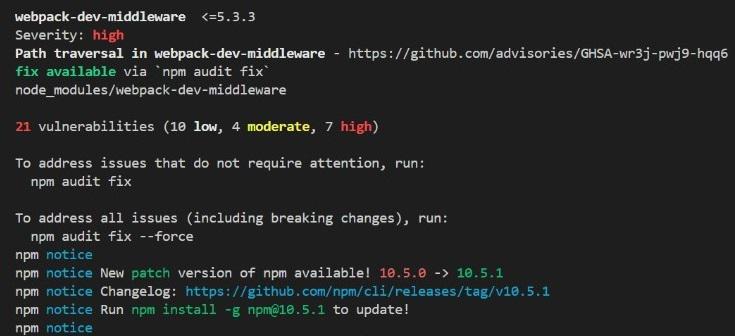
It generates a report containing vulnerability details, severity levels, affected packages, and recommended fixes.
If npm audit fix is used, npm automatically updates vulnerable packages to safer versions whenever possible.
Steps to use npm audit
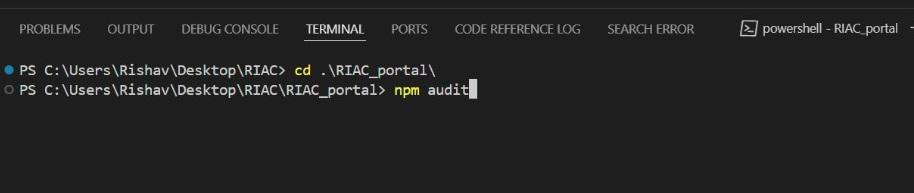
Step 1: Open Terminal and Navigate to Project Directory
Vulnerability Detection: Identifies security vulnerabilities in your project's dependencies.
Severity Levels: Classifies vulnerabilities into high, moderate, and low severity.
Detailed Reports: Provides comprehensive reports with information on each vulnerability.
Fix Recommendations: Offers suggestions on how to resolve identified vulnerabilities.
Best Practices for Addressing Vulnerabilities
Stay Updated: Run npm audit regularly to detect vulnerabilities in dependencies.
Update Dependencies: Update vulnerable packages using the recommended fixes.
Review Vulnerabilities: Prioritize fixes based on vulnerability impact.
Apply Fixes Carefully: Test fixes to avoid breaking functionality.
Automate Security Checks: Add npm audit to the CI pipeline for automated checks
How to fix security vulnerabilities
Apply the suggested fix automatically: If you want npm to automatically fix the vulnerabilities, run npm audit fix. Note that some vulnerabilities cannot be fixed automatically and will require manual intervention or review. There will be additional output in the console.
Configs:npm audit fix runs a full-fledged npm install under the hood, all configs that apply to the installer will also apply to npm install. Commands like npm audit fix --package-lock-only will work as expected. If the update requires moving to a major version, then you’ll need to add the force flag:
npm audit fix --force
Take manual actions: If there are no patches for the identified issues, the security audit report will give you more details on how to carry out manual investigations to address them.