|
VOOZH | about |
|
VOOZH | about |
The module.exports is actually a property of the module object in node.js. module. Exports is the object that is returned to the require() call. By module.exports, we can export functions, objects, and their references from one file and can use them in other files by importing them by require() method.
Purpose:
Example: How to use module.exports in node.js. To start with the following example it is necessary to have node.js installed on your pc.
For verifying type the following command in the terminal. It will show the installed version of Node.Js on your pc.
node -v
Step 1: Create a separate folder and then navigate to that folder by terminal or command prompt.
Step 2: Run the npm init -y command in the terminal or command prompt to create a package.json file
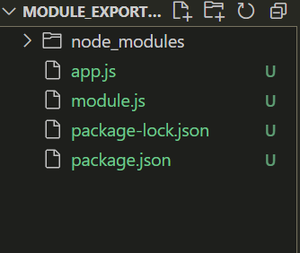
Step 3: Now create two files at the root of your project structure named module.js and app.js respectively.
Project structure: It will look like this:
Step 4: Add the following code to the module.js file
Step 5: Add the following code to app.js file
Step to run the application: Run the following command in your terminal inside your root path of the project (eg:module_exports_tut) folder.
node app.js
Output:
For more information about the module.exports visit https://www.geeksforgeeks.org/node-js/node-js-export-module/