|
VOOZH | about |
|
VOOZH | about |
In PostgreSQL, the ADD COLUMN statement is a powerful command used to modify an existing database table by adding one or more new columns. This feature is important for adapting table structures to meet evolving data requirements, and it plays a key role in database management and optimization.
In this article, we will explain how to effectively use the ADD COLUMN statement in PostgreSQL, with practical examples, detailed explanations, and tips for optimizing its use. We’ll also discuss common scenarios and best practices to help us get the most out of this command.
The ADD COLUMN statement is part of the ALTER TABLE command in PostgreSQL, allowing us to add new columns to an existing table. Once added, the new column will be appended to the end of the table, and we can specify attributes such as the column's data type, default value, and constraints. However, it’s important to note that PostgreSQL doesn’t support directly setting the position of the new column within the table.
Syntax
ALTER TABLE table_name
ADD COLUMN new_column_name data_type;
Parameters
Let us take a look at ADD COLUMN Statement in PostgreSQL to better understand the concept and explore how it can be applied to real-world database scenarios effectively
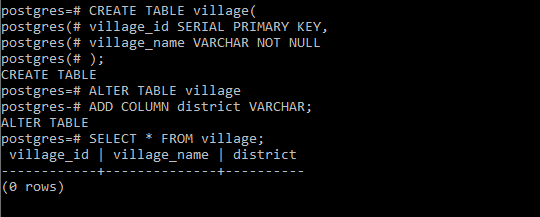
First, create a table named 'village' which contains two columns 'village_id' and 'village_name' columns:
CREATE TABLE village(
 village_id SERIAL PRIMARY KEY,
 village_name VARCHAR NOT NULL
);
To add a district column of type VARCHAR, we use the following ALTER TABLE statement:
ALTER TABLE village
ADD COLUMN district VARCHAR;
Now we can verify if the column has been added using the below statement:
SELECT * FROM village;Output
👁 PostgreSQL ADD COLUMN ExampleExplanation:
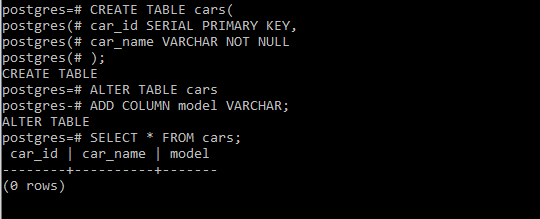
district column has been successfully added to the village table.First, create a table named 'cars' with 'car_id' and 'car_name' columns:
CREATE TABLE cars(
 car_id SERIAL PRIMARY KEY,
 car_name VARCHAR NOT NULL
);
Now we add a model column with a default value of 'Unknown' to the table as below
ALTER TABLE cars
ADD COLUMN model VARCHAR;
Now we can verify if the column has been added using the below statement:
SELECT * FROM cars;Output
👁 PostgreSQL ADD COLUMN ExampleExplanation:
model column has been added to the cars table.The PostgreSQL ADD COLUMN statement is a powerful and flexible tool for modifying the structure of our database tables. By using this command, we can easily add new columns to adapt evolving data needs. While PostgreSQL appends new columns to the end of the table, we can manage column attributes like default values, unique constraints, and data types to meet our specific requirements.