|
VOOZH | about |
|
VOOZH | about |
PostgreSQL's Boolean data type supports three states: TRUE, FALSE, and NULL. It uses a single byte to store Boolean values and can be abbreviated as BOOL. In this article, we will explain the PostgreSQL BOOLEAN data type and its implementation in database table design, highlighting its usage through practical examples.
The BOOLEAN data type in PostgreSQL is a simple data type that can take on one of three possible states: TRUE, FALSE, or NULL. It is often used in scenarios where a binary choice is required, such as flags, status indicators, or simple yes/no fields.
The below table depicts all valid literal values for TRUE and FALSE in PostgreSQL. These values offer flexibility when working with Boolean data, allowing various formats for convenience.
| True | False |
|---|---|
| true | false |
| 't' | 'f' |
| 'true' | 'false' |
| 'y' | 'n' |
| 'yes' | 'no' |
| 1 | 0 |
Let us take a look at some of the examples of BooleanData Type in PostgreSQL to better understand the concept. But first, let's create a sample database called bookstore to demonstrate the usage of the Boolean data type.
Query:
CREATE DATABASE bookstore;
CREATE TABLE book_availability (
 book_id INT NOT NULL PRIMARY KEY,
 available BOOLEAN NOT NULL
);

INSERT INTO book_availability (book_id, available)
VALUES
 (100, TRUE),
 (200, FALSE),
 (300, 't'),
 (400, '1'),
 (500, 'y'),
 (600, 'yes'),
 (700, 'no'),
 (800, '0');
Output
| book_id | available |
|---|---|
| 100 | True |
| 200 | False |
| 300 | True |
| 400 | True |
| 500 | True |
| 600 | True |
| 700 | False |
| 800 | False |
Explanation:
This table illustrates the book_id along with its corresponding availablestatus, demonstrating the use of the BOOLEAN data type in PostgreSQL.
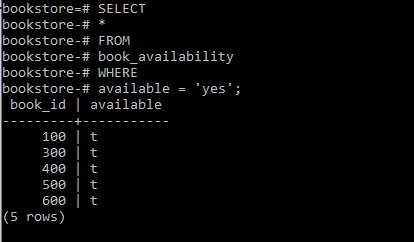
In this example we will query for all the available books in the bookstore.
Query:
SELECT
 *
FROM
 book_availability
WHERE
 available = 'yes';
Output
Explanation:
This query will return all books that are marked as unavailable using any of the valid FALSE literal values.
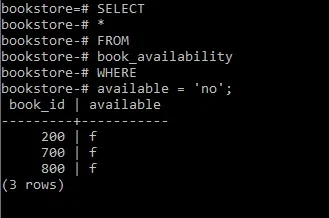
In this example we will query for all books that are NOT available in the bookstore.
Query:
SELECT
 *
FROM
 book_availability
WHERE
 available = 'no';
Output
Explanation:
This query will return all books that are marked as unavailable using any of the valid FALSE literal values.
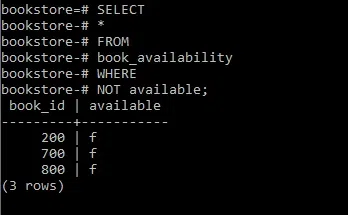
In this example we will make the use of NOT operator to check for books that are not available in the bookstore.
Query:
SELECT
 *
FROM
 book_availability
WHERE
 NOT available;
Output
Explanation:
his query will return all books where the available field is set to FALSE.
:: operator.bool_and()' and 'bool_or()', which can be useful in analytical queries.In PostgreSQL, the BOOLEAN data type efficiently stores binary states and supports three values: TRUE, FALSE, and NULL. Its storage size of just 1 byte makes it a lightweight choice for representing yes/no conditions in our applications. By understanding and utilizing PostgreSQL boolean constants, such as TRUE, FALSE, and their string equivalents, developers can build meaningful queries and effectively manage data.