|
VOOZH | about |
|
VOOZH | about |
JSON (JavaScript Object Notation) is a widely used format for storing data in the form of key-value pairs. Its popularity comes from being easy for humans to read and understand, making it ideal for communication between servers and clients. This readability and ease of use have made JSON a standard in web development and API design.
In this article, we will explain how to effectively use the JSON data type in PostgreSQL, covering its syntax, functions, and performance benefits. We will learn how to store, query, and manipulate JSON data using practical examples.
PostgreSQL has supported a native JSON data type since version 9.2. This addition allows PostgreSQL to store and manipulate JSON data efficiently. PostgreSQL offers numerous functions and operators for handling JSON data, making it a powerful tool for developers who need to work with JSON.
Syntax
variable_name json;Now, let's look into a few examples of JSON Data Type in PostgreSQL for demonstration. These examples will showcase how to create tables, insert JSON data, and retrieve specific information from JSON fields effectively.
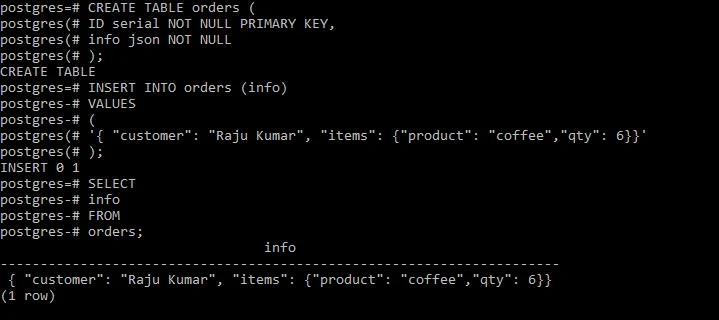
In this example, we first create a table named orders with two columns: an auto-incrementing ID column as the primary key, and an infocolumn to store JSON data. We then insert a JSON object into the orders table containing details about a customer’s order using the below command
Query:
CREATE TABLE orders (
 ID serial NOT NULL PRIMARY KEY,
 info json NOT NULL
);

INSERT INTO orders (info)
VALUES
 (
 '{ "customer": "Raju Kumar", "items": {"product": "coffee", "qty": 6}}'
 );
Now we will query for the orders information using the below command:
SELECT info
FROM orders;
Output
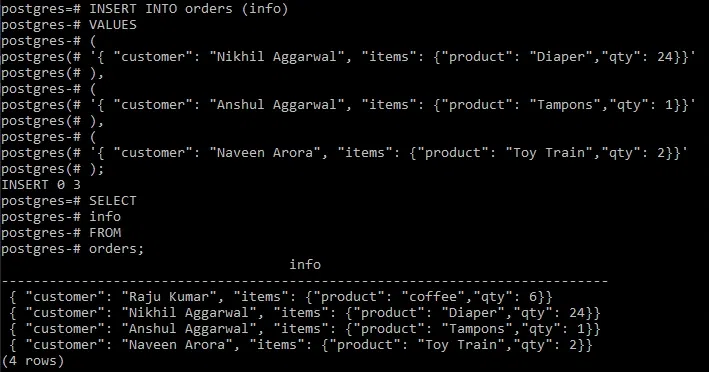
In the above example we created an orders table and added single JSON data into it. Now in this Example, we will insert multiple JSON objects into the orders table using the below given PostgreSQL query.
Query:
INSERT INTO orders (info)
VALUES
 (
 '{ "customer": "Nikhil Aggarwal", "items": {"product": "Diaper", "qty": 24}}'
 ),
 (
 '{ "customer": "Anshul Aggarwal", "items": {"product": "Tampons", "qty": 1}}'
 ),
 (
 '{ "customer": "Naveen Arora", "items": {"product": "Toy Train", "qty": 2}}'
 );
Now we will query for the orders information using the below command:
SELECT info
FROM orders;
Output
PostgreSQL provides a variety of functions and operators to manipulate JSON data. Here are a few commonly used ones:
In this Example, we want to extract the customer names from the JSON data. We can use the ->> operator as shown in the below PostgreSQL query for Extracting Data from JSON.
Query:
SELECT info ->> 'customer' AS customer_name
FROM orders;
Output
Nikhil Aggarwal |
|---|
Anshul Aggarwal |
Naveen Arora |
This Example explains that we can also filter rows based on the content of the JSON data. The below given PostgreSQL query is for finding the orders where the product is "Diaper":
Query:
SELECT info
FROM orders
WHERE info -> 'items' ->> 'product' = 'Diaper';
Output
{ "customer": "Nikhil Aggarwal", "items": {"product": "Diaper", "qty": 24} }In summary, PostgreSQL provides powerful capabilities for working with JSON data types through its native JSON and JSONB types. With a robust set of functions and operators, developers can efficiently store, query, and manipulate JSON data, making it a valuable asset in today’s data-driven applications. For optimal performance and flexibility, it is generally recommended to use the JSONB data type.