|
VOOZH | about |
|
VOOZH | about |
In PostgreSQL, the REVOKE statement plays a crucial role in managing database security by removing previously granted privileges from roles or users.
Let us better understand the REVOKE Statement in PostgreSQL from this article.
The following shows the syntax of the REVOKE statement:
REVOKE privilege | ALL
ON TABLE tbl_name | ALL TABLES IN SCHEMA schema_name
FROM role_name;
Let's analyze the above syntax:
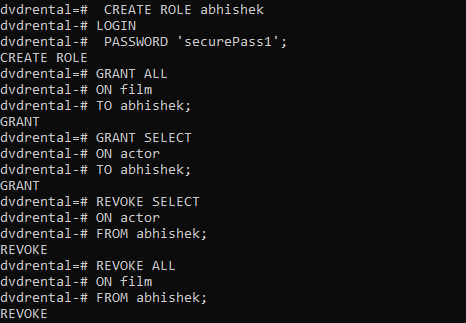
Let us look into an example of REVOKE statement in PostgreSQL.
First, log into the dvdrental sample database as Postgres:
psql -U postgres -d dvdrentalNow initialize a role called 'abhishek' with the LOGIN and PASSWORD attributes as shown below:
CREATE ROLE abhishek
LOGIN
PASSWORD 'geeks12345';
Now grant all privileges on the 'film' table to the role 'abhishek' as shown below:
GRANT ALL
ON film
TO abhishek;
Now provide the SELECT privilege on the actor table to the role 'abhishek' as shown below:
GRANT SELECT
ON actor
TO abhishek;
Here we will revoke the SELECT privilege on the 'actor' table from the role 'abhishek', as shown below:
REVOKE SELECT
ON actor
FROM abhishek;
If you wish to revoke all privileges on the film table from the role 'abhishek', make use of the REVOKE statement with the ALL option as shown below:
REVOKE ALL
ON film
FROM abhishek;
Output:
👁 PostgreSQL REVOKE Statement Example
- Revoking privileges does not affect existing data in the database but prevents the role from performing actions (like querying or modifying data) as specified by the revoked privileges.
- The REVOKE command can only remove privileges that were previously granted to the role.
- If a role has been granted privileges through other roles (i.e., role hierarchies), revoking privileges from the parent role may affect child roles as well.
- If you attempt to revoke privileges that a role does not have, PostgreSQL will not produce an error; the command will simply have no effect.