|
VOOZH | about |
|
VOOZH | about |
Renaming a table in PostgreSQL is a common task that can be quickly done using the RENAME clause in combination with the ALTER TABLE statement. This article will walk you through the process of renaming an existing table in PostgreSQL, explaining the syntax, and providing a detailed example.
ALTER TABLE table_name
RENAME TO new_table_name;
In the above syntax:
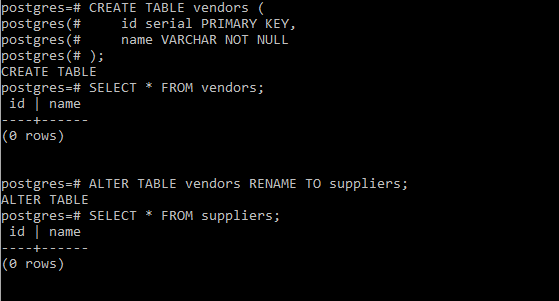
For the purpose of example let’s first create a table using the below statements and then we will attempt to rename it:
Now that our table is ready, let's jump into an example.
In this we will rename the 'vendors' table to 'suppliers', using the following ALTER TABLE RENAME TO statement:
ALTER TABLE vendors RENAME TO suppliers;
After executing the above command, the table name will be updated. You can verify the change by running a query to select data from the newly renamed table:
SELECT * FROM suppliers;Output:
👁 PostgreSQL Rename Table ExampleIf the renaming process was successful, you should see the same data and structure under the new table name, 'suppliers'.
- If you attempt to rename a table that doesn’t exist, PostgreSQL will raise an error, so ensure the table name is correct before executing the command.
- To rename multiple tables, you must execute multiple
ALTER TABLE RENAME TOstatements; it is not possible to rename multiple tables in a single command.- After renaming a table, make sure to update any application code, scripts, or queries that reference the old table name to prevent errors.
- When renaming a table, choose a name that accurately reflects the data it contains. This improves the readability and maintainability of your database.