|
VOOZH | about |
|
VOOZH | about |
Creating a database in PostgreSQL is an important task for developers and database administrators to manage data effectively. PostgreSQL provides multiple ways to create adatabase, catering to different user preferences, whether through the command-line interface or using a graphical interface like pgAdmin
In this article, we will explain various methods of creating a database in PostgreSQL, including using the psql shell and pgAdmin. This article will also cover important points about database settings, encoding, collation, and connection limits.
Creating a database in PostgreSQL can be done using the CREATE DATABASESQL statement in the psql shell or via the createdb command-line utility. Additionally, for users who prefer a graphical interface, pgAdmin offers a convenient way to manage databases. Let's explore step-by-step how to create a PostgreSQL database in detail.
The PSQL provides a command-line interface to create a database using the CREATE DATABASE SQL command. This method allows us to define specific parameters such as owner, template, and tablespace to customize your database.
Syntax:
CREATE DATABASE db_name
 OWNER = role_name
 TEMPLATE = template
 ENCODING = encoding
 LC_COLLATE = collate
 LC_CTYPE = ctype
 TABLESPACE = tablespace_name
 CONNECTION LIMIT = max_concurrent_connection
key terms
Let's understand the PostgreSQL CREATE DATABASE command with some basic examples to showcase how to create databases with default settings and specific parameters. These examples will help us to understand the process of configuring a database's owner, encoding, connection limits, and more.
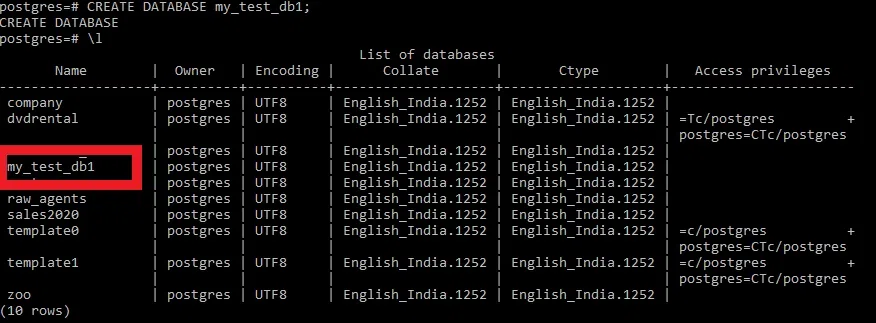
In this example, we will create a simple test database using the default settings provided by PostgreSQL. By removing optional parameters like encoding and connection limits, PostgreSQL automatically applies the defaults such as UTF8 encoding, default tablespace, and unlimited connections.
Query:
CREATE DATABASE my_test_db1;Output
Explanation:
A new database named my_test_db1 is created with default settings.
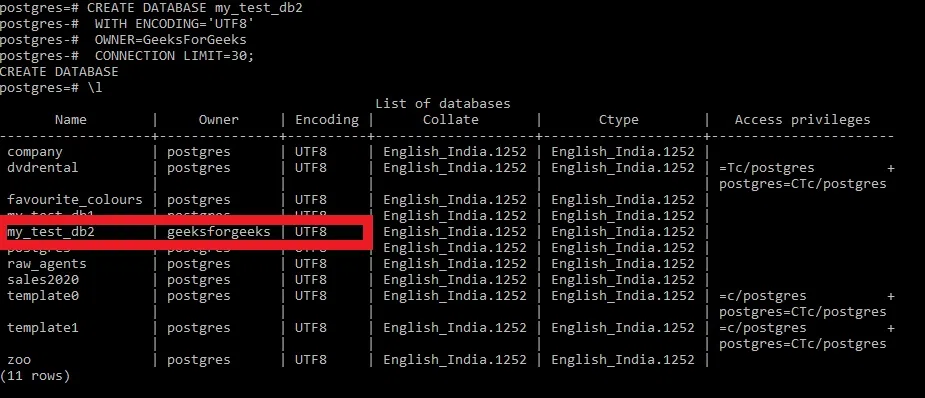
In this example, we will create a database with specific settings, including encoding, owner, and a limit on concurrent connections. Now we will create a test database with the following parameters:
Query:
CREATE DATABASE my_test_db2
 WITH ENCODING='UTF8'
 OWNER=GeeksForGeeks
 CONNECTION LIMIT=30;
Output
Explanation:
The database my_test_db2 is created with UTF-8 encoding, owned by GeeksForGeeks, and limited to 30 concurrent connections.
pgAdmin is a popular graphical interface for PostgreSQL that simplifies database management. Follow these steps to create a new database using pgAdmin
Open pgAdmin and connect to our PostgreSQL server.
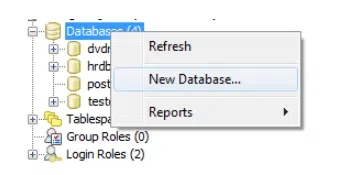
Right click on the Databases menu and then click on New Database... sub-menu item as depicted below:
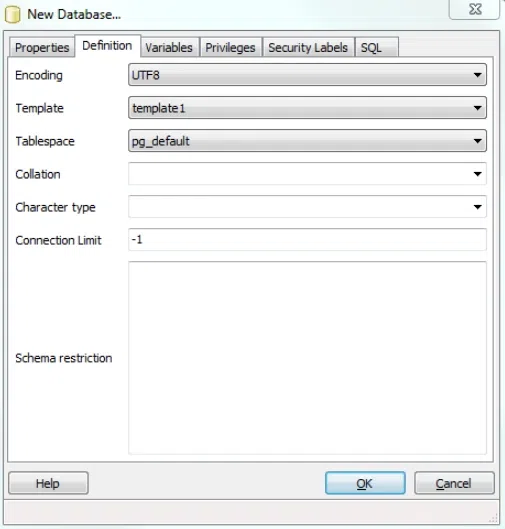
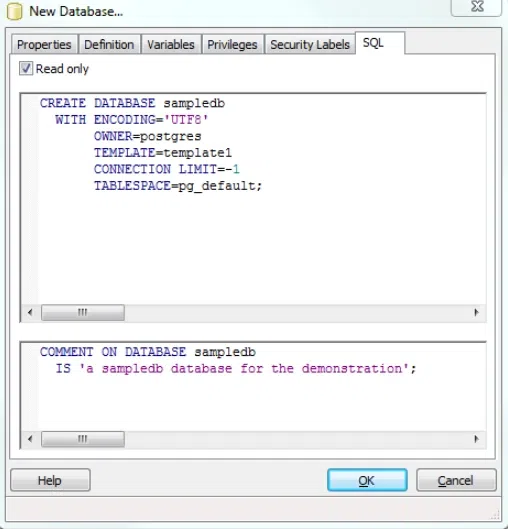
In the New Database dialog, enter the new database name, owner, and configure other parameters. Click the OK button to create the database.
CREATEDB privilege or superuser status) to create a database.template1 database. You can specify a different template if needed.Creating a database in PostgreSQL is straightforward and can be done through the CREATE DATABASE SQL statement in the psql shell or using the createdb command-line utility. For users who prefer a graphical interface, pgAdmin simplifies the process of creating databases with customizable parameters like encoding, tablespaces, and connection limits.
This article has covered essential points and examples to help us efficiently create and manage databases in PostgreSQL. Make sure to configure our database settings correctly, especially regarding encoding, collation, and template databases, to ensure optimal performance.