|
VOOZH | about |
|
VOOZH | about |
Creating tables in a PostgreSQL database using Python is a common task for developers working with databases. This process involves defining the structure of your data and ensuring that your database is optimized for efficient storage and retrieval.
In this article, we will walk through the steps of creating tables in PostgreSQL using Python.
To create a table in the database use the following steps:
To demonstrate the process, let's walk through an example where we create several tables in a PostgreSQL database named 'school'. We'll use a Python script named 'create_table.py', which includes a function called 'create_table()'.
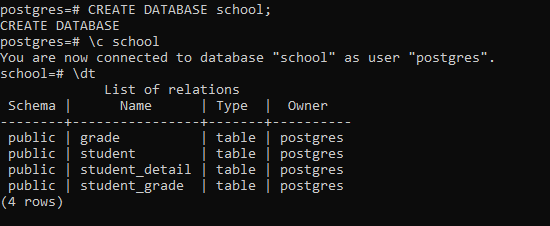
To verify so use the below command through the client tool of the same database(ie, school):
\dt
Output:
This will successfully create the tables :
- Use consistent and descriptive names for tables and columns.
- Choose appropriate data types for each column to ensure efficient storage and accurate data representation.
- Define constraints such as PRIMARY KEY, FOREIGN KEY, and UNIQUE to enforce data integrity.
- Consider adding indexes on columns that will be frequently searched or used in join operations.