|
VOOZH | about |
|
VOOZH | about |
Pandas Series is a one-dimensional labeled array capable of holding data of any type (integer, string, float, python objects, etc.). Labels need not be unique but must be a hashable type. An element in the series can be accessed similarly to that in an ndarray. Elements of a series can be accessed in two ways:
In this article, we are using “nba.csv” file, to download the CSV, click here.
In order to access the series element refers to the index number. Use the index operator [ ] to access an element in a series. The index must be an integer.
In order to access multiple elements from a series, we use Slice operation. Slice operation is performed on Series with the use of the colon(:). To print elements from beginning to a range use [:Index], to print elements from end-use[:-Index], to print elements from specific Index till the end use [Index:], to print elements within a range, use [Start Index:End Index] and to print whole Series with the use of slicing operation, use [:]. Further, to print the whole Series in reverse order, use [::-1].
In this example, a Pandas Series named 'ser' is created from a NumPy array 'data' containing the elements 'g', 'e', 'e', 'k', 's', 'f', 'o', 'r', 'g', 'e', 'e', 'k', 's'. The first element of the series is accessed and printed using `print(ser[0])`
Output:
gIn this example, a Pandas Series named 'ser' is created from a NumPy array 'data' containing the elements 'g', 'e', 'e', 'k', 's', 'f', 'o', 'r', 'g', 'e', 'e', 'k', 's'. The first five elements of the series are accessed and printed using print(ser[:5]).
Output:
0 g
1 e
2 e
3 k
4 s
dtype: object
In this example, a Pandas Series named 'ser' is created from a NumPy array 'data' containing the elements 'g', 'e', 'e', 'k', 's', 'f', 'o', 'r', 'g', 'e', 'e', 'k', 's'. The last 10 elements of the series are accessed and printed using `print(ser[-10:])`.
Output:
3 k
4 s
5 f
6 o
7 r
8 g
9 e
10 e
11 k
12 s
dtype: object
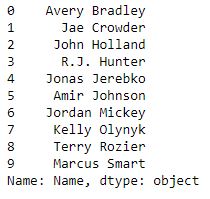
nba.csv FileIn this example, the Pandas module is imported, and a DataFrame 'df' is created by reading data from a CSV file named "nba.csv" using `pd.read_csv`. A Pandas Series 'ser' is then created by selecting the 'Name' column from the DataFrame. Finally, the first 10 elements of the series are accessed and displayed using ser.head(10).
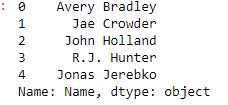
👁 ImageNow we access first 5 elements of series.
Output:
👁 ImageIn order to access an element from series, we have to set values by index label. A Series is like a fixed-size dictionary in that you can get and set values by index label. Here, we will access an element in Pandas using label.
In this example, a Pandas Series 'ser' is created from a NumPy array 'data' with custom indices provided. The element at index 16 is accessed and printed using `print(ser[16])`.
Output:
o
In this example, a Pandas Series 'ser' is created from a NumPy array 'data' with custom indices provided. Multiple elements at indices 10, 11, 12, 13, and 14 are accessed and printed using `print(ser[[10, 11, 12, 13, 14]])`.
Output:
10 g
11 e
12 e
13 k
14 s
dtype: object
In this example, a Pandas Series 'ser' is created using NumPy's arange() function with values from 3 to 8 and custom indices. Elements at indices 'a', 'd' are accessed and printed using `print(ser[['a', 'd']])`.
Output:
a 3.0
d 6.0
dtype: float64
nba.csv FileIn this example, the Pandas module is imported, and a DataFrame 'df' is created by reading data from a CSV file named "nba.csv" using `pd.read_csv`. A Pandas Series 'ser' is then created by selecting the 'Name' column from the DataFrame. Finally, the first 10 elements of the series are accessed and displayed using `ser.head(10)`.
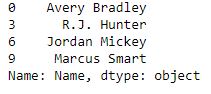
👁 ImageNow we access an multiple element using index label.