|
VOOZH | about |
|
VOOZH | about |
We will build a simple Django app that shortens long URLs. Users will enter a URL on the homepage, submit it, and instantly get a shortened link on the next page. We’ll set up the Django project, connect to Bitly with an access token, handle user input, and display the results all in a clean, easy-to-follow way.
Prerequisites:
Open your terminal and run the following command to create a new Django project:
django-admin startproject URL_Shortner
cd URL_Shortner
Create an app named home where the logic for the URL shortener will be handled.
python manage.py startapp home
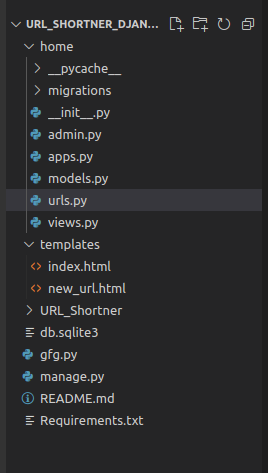
This is the final file structure after completing the project.
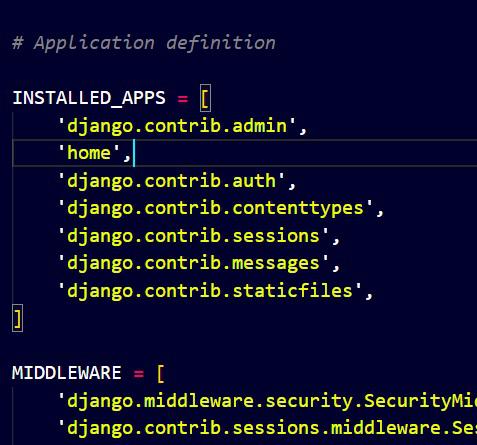
Open URL_Shortner/settings.py and add home to the INSTALLED_APPS list:
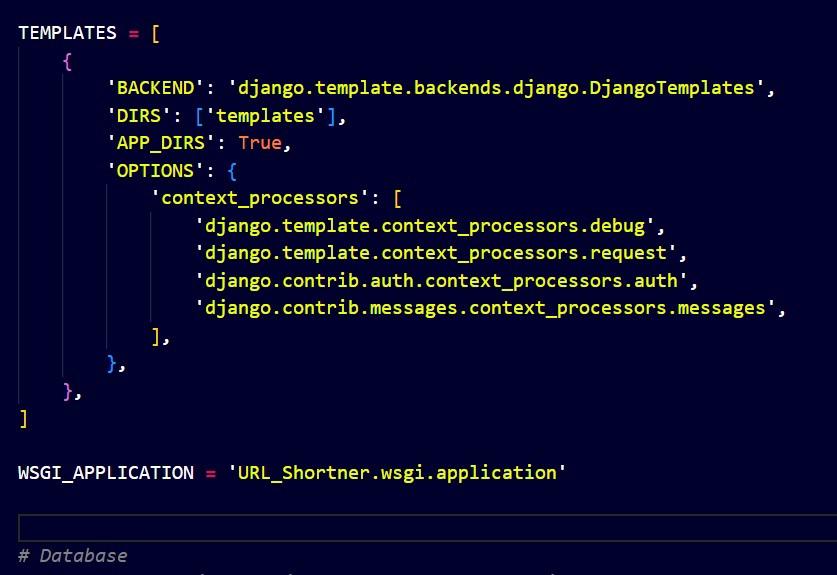
Set the templates directory in the URL_Shortner/settings.py file.
Open URL_Shortner/urls.py and configure it to include URLs from the home app.
In home/urls.py, set up the routes for the home page and form submission.
In home/views.py, create functions to handle the form display and URL shortening process using the Bitly API.
Explanation:
Create a templates directory inside the home app. Inside this directory, create the index.html and new_url.html files.
This file displays the form where users can input a long URL.
This file will display the shortened URL after processing.
python manage.py runserver
Open your browser and go to http://127.0.0.1:8000/ to view the homepage.
Enter a long URL in the form, and the app will redirect to the new_url.html page with the shortened URL.
Output:
On submitting the URL a new page appears with a new short link.