|
VOOZH | about |
|
VOOZH | about |
This step-by-step tutorial for constructing a mock API in Python using Swagger. In this article, we'll step through the full process, from defining our API with Swagger to developing and testing a mock server. Whether you're an experienced developer or just starting started, this article will show you how to construct Mock APIs with Swagger. The project entails developing basic Mock APIs with Swagger, building a mock server in Python, and testing it to replicate API behavior.
Basic Terminologies
Using Swagger, we will build a "basic Todo API", produce a Python server stub, implement mock server logic, and execute the application. To replicate API answers, mock data for todos will be utilized. Below is the step-by-step procedure to build mock APIs with Swagger:
In this step, we will install all the dependencies that we will require to build Mock APIs with Swagger. These are:
Install the below dependencies using pip and the following command:
pip install flask-restful
pip install flasggerFolder Structure
|--->app.py
|--->swagger.yml
The provided Swagger YAML file (swagger.yml) defines the API structure and is used by the Swagger instance to generate Swagger UI documentation for the API. In this code, a Swagger 2.0 specification defines a Todo API with CRUD operations. It includes endpoints for retrieving all todos, creating a new todo, and managing individual todos by ID through GET, PUT, and DELETE operations.
In this Python code, a Flask application is created to implement a Todo API using Flask-Restful. The endpoints for managing todos are defined with GET, PUT, DELETE, POST methods, and Swagger is integrated for API documentation using the provided Swagger YAML template.
app.py
Step By Step Explanation of this Code
Import Necessary Modules
Import necessary modules and libraries, including Flask for the web framework, request for handling HTTP requests, Api and Resource from Flask-RESTful for building REST APIs, and Swagger from flasgger for integrating Swagger UI. Initialize the Flask app, API, and Swagger.
TodoResource Class
Define a class for handling individual todos (TodoResource). Implement methods for handling GET (retrieve todo by ID), PUT (update todo by ID), and DELETE (delete todo by ID) operations. The methods use the global todos list to store todo items.
TodoListResource Class
Define a class for handling the list of todos (TodoListResource). Implement methods for handling GET (retrieve all todos) and POST (create a new todo) operations. The POST method adds a new todo to the todos list.
Resource Registration
Register the TodoListResource class to handle routes for listing and creating todos ('/todos') and the TodoResource class to handle routes for individual todos ('/todos/<int:todo_id>'). Start the Flask application if the script is run directly.
Execute the Python script (python app.py). To execute the script, open a terminal and navigate to the project directory then run the command:
python app.py
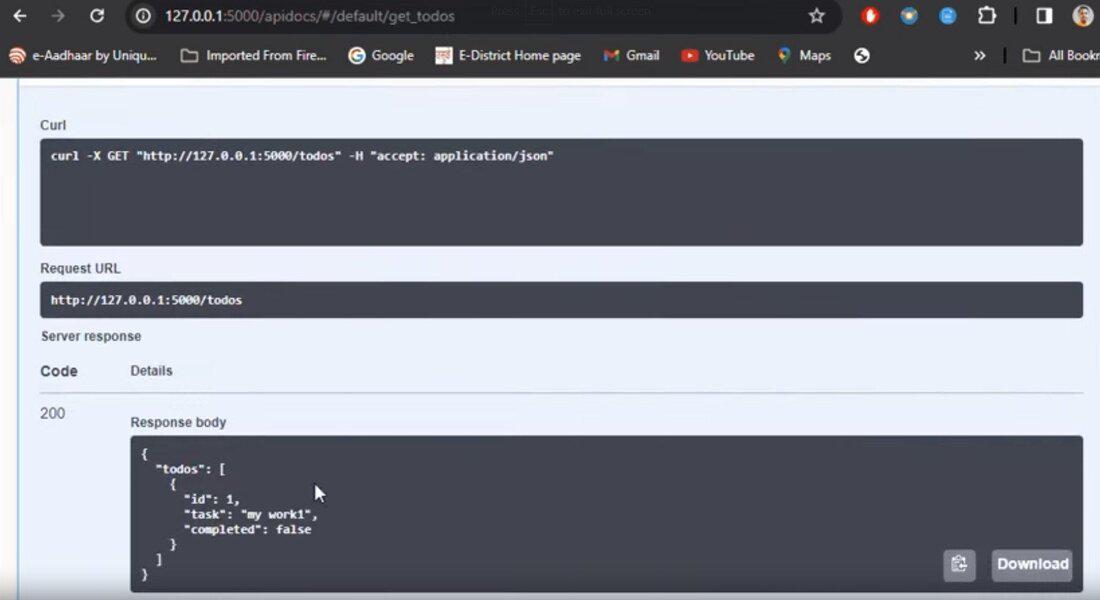
Now, access Swagger UI at http://127.0.0.1:5000/apidocs/ to interact with the mock API.
http://127.0.0.1:5000/apidocs/
Output
👁 Screenshot2024-01-17112658-ezgifcom-resize
Below is the step-by-step procedure to build another mock APIs with Swagger in Python.
Note: We are using same file structure as above.
Folder Structure
 |--->books.py
 |--->swagger_books.yml
In this code, a Swagger 2.0 specification defines a simple Book API with CRUD operations, including endpoints for retrieving all books, creating a new book, and managing individual books by ID through GET, PUT, and DELETE operations. The API documentation is structured to include details about book title, author, and appropriate HTTP responses.
In this Python code, a Flask application with Flask-Restful is implemented to create a Book API. Endpoints for managing books include GET, PUT, DELETE, and POST methods, with Swagger used for API documentation based on the provided Swagger YAML template ('swagger_books.yml'). The code defines resources for book details, supports CRUD operations, and runs a development server when executed.
books.py
Execute the Python script (python app.py). To execute the script, open a terminal and navigate to the project directory then run the command:
python books.py
Now, access Swagger UI at http://127.0.0.1:5000/apidocs/ to interact with the mock API.
http://127.0.0.1:5000/apidocs/