|
VOOZH | about |
|
VOOZH | about |
Django Rest Framework (DRF) provides powerful tools for building RESTful APIs in Django projects. One of the key components of DRF is Concrete GenericAPIViews, which offer pre-implemented views for common CRUD (Create, Read, Update, Delete) operations. In this article, we will see Concrete GenericAPIViews in Django Rest Framework.
Concrete GenericAPIViews in Django are pre-defined view classes that simplify the creation of RESTful APIs by providing ready-to-use functionalities for common HTTP methods like GET, POST, PUT and DELETE. They include classes like ListAPIView, CreateAPIView, RetrieveAPIView, UpdateAPIView, and DestroyAPIView, reducing the need for writing repetitive code.
Below, are the Implementation of Concrete GenericAPIViews in the Django Rest Framework in Python:
To start the project use this command
django-admin startproject bookstore
cd bookstore
To start the app use this command
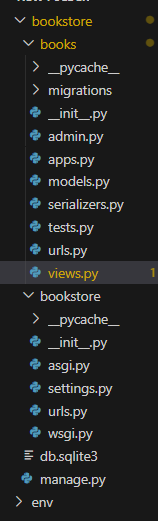
django-admin startapp booksNow add this app to the ‘settings.py’
INSTALLED_APPS = [
 "django.contrib.admin",
 "django.contrib.auth",
 "django.contrib.contenttypes",
 "django.contrib.sessions",
 "django.contrib.messages",
 "django.contrib.staticfiles",
 "books",
 "rest_framework",
]
For install the Django rest_framework use the below command
pip install djangorestframeworkbooks/models.py: Define the Book model as follows:
books/serializers.py : Create a file named serializers.py and define the Book serializer.
books/views.py : Create a file named views.py and define the views for handling CRUD operations:
books/urls.py : Define the URLs for the views using the following code:
bookstore/urls.py: Include the URLs of the books app using the following code.
Run these commands to apply the migrations:
python3 manage.py makemigrations
python3 manage.py migrate
Run the server with the help of following command:
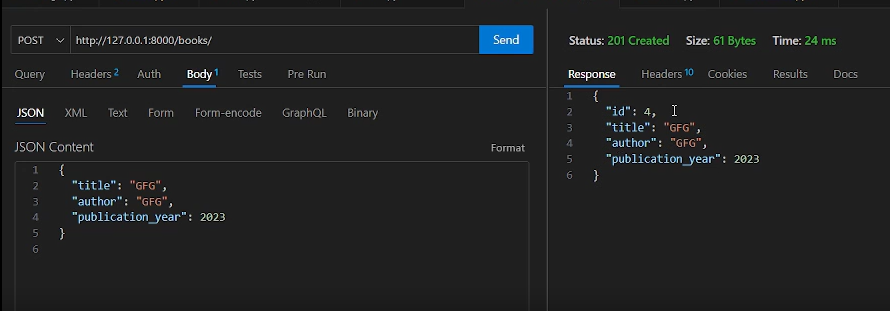
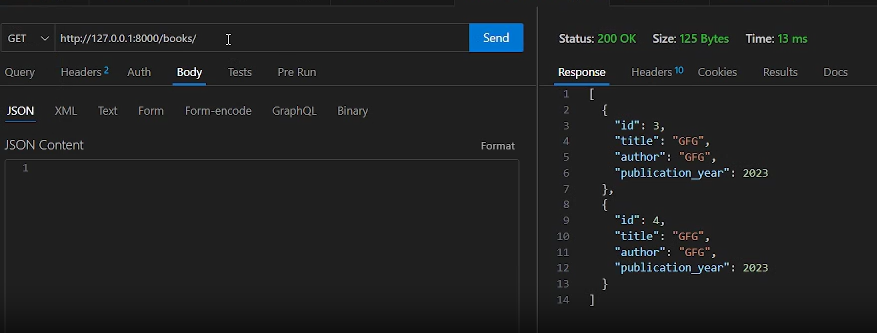
python3 manage.py runserverOutput