|
VOOZH | about |
|
VOOZH | about |
Object-level permissions in Django REST Framework (DRF) allow you to control access to individual model instances. While standard permissions check whether a user can access a view, object-level permissions determine whether a user can perform actions on a specific object.
To implement custom object-level permissions, create a class that inherits from rest_framework.permissions.BasePermission and override one or both of the following methods:
Even if general permissions are set on a model, any authenticated user might still be able to modify or delete objects. Custom object-level permissions ensure that only the owner of an object can update or delete it, preventing unauthorized actions on individual records
Consider a project named 'robot_project' having an app named 'robots'. Inside the robots folder, create a new file named custompermission.py:
IsCurrentUserOwnerOrReadOnly class inherits from BasePermission and overrides has_object_permission. Safe methods are allowed for all users, while unsafe methods are restricted to the object owner.
Add the owner field to the robots/models.py file.
owner = models.ForeignKey(
'auth.User',
related_name= 'robots',
on_delete=models.CASCADE
)
Complete Robot model:
models.CASCADE ensures that deleting a user also deletes associated robots.
Add the owner field in robots/serializers.py:
owner = serializers.ReadOnlyField(source='owner.username')
Full RobotSerializer:
UserRobotSerializer serializes a user's robots with minimal fields. UserSerializer nests the robots under the user.
Override perform_create in RobotList:
The perform_create method passes the owner information to the create method using the serializer.save method.
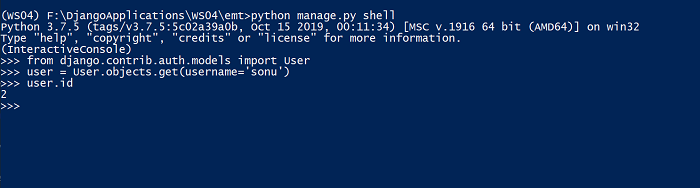
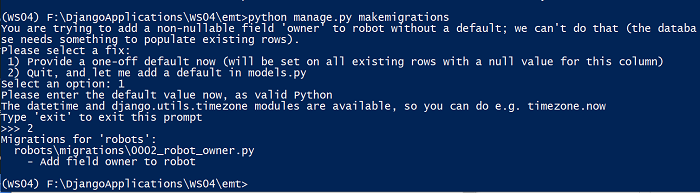
A new owner field has been added to the Robot table. Run the migrations to apply these changes to the database. For existing robot records, a default owner must be assigned by noting the ID of an existing user and providing it during the migration. The user ID can be found using the Django shell:
Migrations:
👁 ImageRun the "python manage.py migrate" command to apply the generated migrations.
Add Basic Authentication in settings.py:
REST_FRAMEWORK = {
'DEFAULT_AUTHENTICATION_CLASSES':(
'rest_framework.authentication.BasicAuthentication',
)
}
Retrieve robots (safe method, no authentication needed):
http :8000/robot/
Output:
HTTP/1.1 200 OK
Allow: GET, POST, HEAD, OPTIONS
Content-Language: en
Content-Length: 2116
Content-Type: application/json
Date: Sun, 29 Aug 2021 07:11:39 GMT
Referrer-Policy: same-origin
Server: WSGIServer/0.2 CPython/3.7.5
Vary: Accept, Accept-Language
X-Content-Type-Options: nosniff
X-Frame-Options: DENY
[
{
"currency": "USD",
"currency_name": "US Dollar",
"manufacturer": "Fanuc",
"manufacturing_date": "2019-10-12T00:00:00Z",
"name": "FANUC M-710ic/50",
"owner": "sonu",
"price": 37000,
"robot_category": "Articulated Robots",
"url": "http://localhost:8000/robot/1/"
},
{
"currency": "USD",
"currency_name": "US Dollar",
"manufacturer": "ABB",
"manufacturing_date": "2020-05-10T00:00:00Z",
"name": "IRB 1100",
"owner": "sonu",
"price": 25000,
"robot_category": "Articulated Robots",
"url": "http://localhost:8000/robot/7/"
},
]
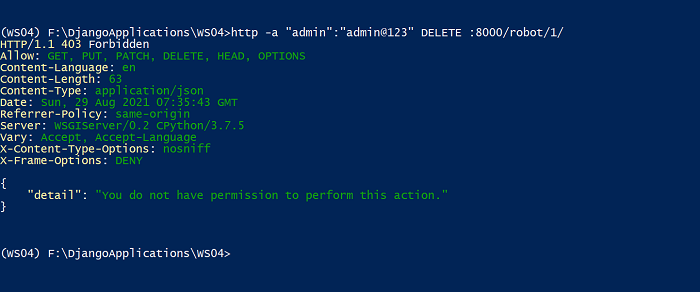
Delete a robot (only owner allowed):
Superuser:
http -a "admin":"admin@123" DELETE :8000/robot/1/
Output:
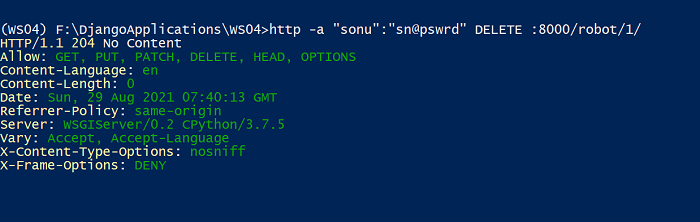
👁 ImageOwner:
http -a "sonu":"sn@pswrd" DELETE :8000/robot/1/
Output:
👁 ImageOutput shows the robot is deleted only when the authenticated user is the owner.