|
VOOZH | about |
|
VOOZH | about |
A DeleteView is a built-in class-based view used to remove a record from the database. It automatically fetches the record, shows a confirmation page, deletes the record, and redirects.
Example: Consider a project named 'geeksforgeeks' having an app named 'geeks'. After you have a project and an app, let's create a model of which we will be creating instances through our view.
In geeks/models.py:
After creating this model, we need to run two commands in order to create Database for the same:
Python manage.py makemigrations
Python manage.py migrate
Let's create some instances of this model using shell, enter the following command to launch Python shell:
Python manage.py shell
Enter following commands to create entries in database:
>>> from geeks.models import GeeksModel
>>> GeeksModel.objects.create( title="title1", description="description1")
>>> GeeksModel.objects.create(title="title2", description="description2")
>>> GeeksModel.objects.create(title="title3", description="description3")
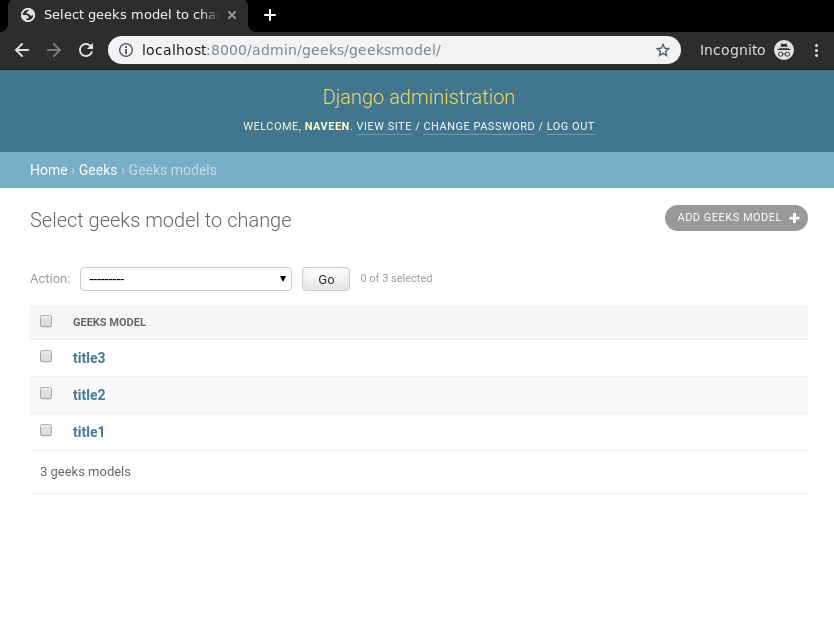
Now we have everything ready for back end. Verify that instances have been created from http://localhost:8000/admin/geeks/geeksmodel/
👁 django-listview-check-models-instances
Class Based Views automatically setup everything. One just needs to specify which model to create DeleteView for, then Class based DeleteView will automatically try to find a template in app_name/modelname_confirm_delete.html. In our case it is geeks/templates/geeks/geeksmodel_confirm_delete.html.
Create class based view in geeks/views.py:
Now create a url path to map the view. In geeks/urls.py:
Create a template in templates/geeks/geeksmodel_confirm_delete.html:
Check what is there on: http://localhost:8000/1/delete
👁 django-deleteview-class-based-views
Tap confirm and object will redirect to "success_url" defined in the view. Let's check if title1 is deleted from database.