|
VOOZH | about |
|
VOOZH | about |
We will learn how to build a simple Django app that lets users add book details and download the data as a CSV file. We'll create models, forms, views and templates, then implement CSV generation to enable easy data export from your web application.
Prerequisites:
Open your terminal and run:
django-admin startproject csv_downloader
cd csv_downloader
python manage.py startapp gfg
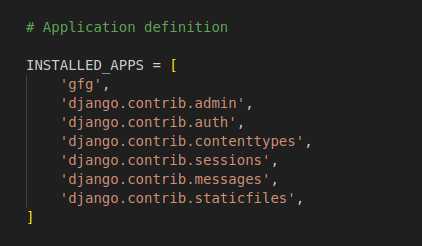
In csv_downloader/settings.py, add 'gfg' to INSTALLED_APPS:
👁 Screenshot-from-2023-09-17-17-25-54
gfg/models.py: This code defines a Django model named Book with three fields: title (for the book title), author (for the author's name) and publication_year (for the publication year of the book). It also includes a __str__ method to display the book's title as its string representation.
gfg/forms.py: The provided code defines a Django form called BookForm using the forms.ModelForm class. It's designed to work with the Book model in a Django application. The form includes fields for 'title', 'author' and 'publication_year', which are derived from the corresponding model fields.
gfg/view.py: The "home" view handles HTTP requests, checking for POST submissions. If valid, it saves book data to the database and redirects to the home page. For GET requests, it displays an empty book input form via an HTML template ('gfg/create_user_profile.html') with the form as context data.
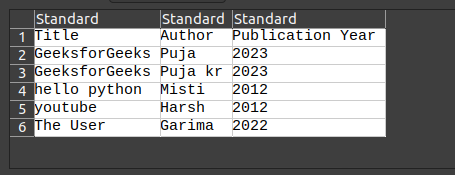
The generate_csv view generates a CSV file as an HTTP response, sets the content type to 'text/csv' with the filename "book_catalog.csv," writes column names as the header, fetches all books from the database, writes book details to the CSV and serves the file for user download upon accessing the view.
gfg/urls.py: This is the URL file inside the test app .The first path is used to direct to the home page and the second is used to generate the CSV file.
urls.py: This is the main url file. Here we have included the app URLs by the help of "include"
Create directory structure:
gfg/
└── templates/
└── gfg/
└── create_user_profile.html
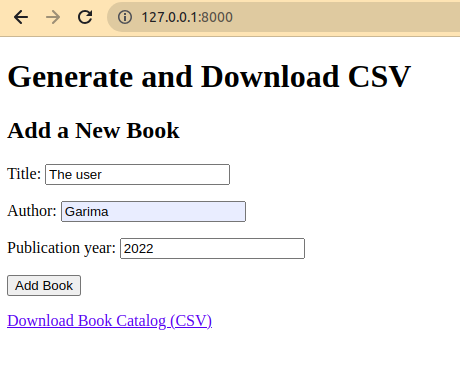
create_user_profile.html: This file is used to Collect the book information from the user and download the csv file after collecting all the data from the user.
Run migrations to create the database tables:
python manage.py makemigrations
python manage.py migrate
Start your Django server:
python manage.py runserver
Output:
CSV output: