|
VOOZH | about |
|
VOOZH | about |
The article demonstrates building CRUD REST APIs using Django REST Framework (DRF) for a supermarket inventory system. It manages categories, subcategories, and products through RESTful endpoints that support creating, retrieving, updating, and deleting records.
Make sure Django is installed and configured before continuing. If not, refer to the following article for setup instructions:
Run the following command to install Django REST Framework:
pip install djangorestframework
👁 install Django REST Framework
After installing the REST framework, go to settings.py, and in INSTALLED_APPS add ‘rest_framework’ at the bottom.
Step 1: After installing DRF and adding it to settings.py, let's create an app using the command:
python manage.py startapp api
After executing the command, Django creates a new application named api within the project.
👁 django api create app folder
Step 2: Add this app to INSTALLED_APPS and urls.py also in, settings.py.
Step 3: Add the api URL patterns to the project's urls.py file. In gfg_shopping/urls.py, include the following code:
Create the Item model, which defines the data structure used by the API for CRUD operations.
Now after app gets ready, create the serializer for Item class.
The Item model must be converted into a format that can be sent and received through API requests. ModelSerializer handles this conversion automatically by generating serializer fields from the model, allowing CRUD operations to be implemented with minimal code.
Now create serlializers.py file in the api folder.
To render data into frontend, and handle requests from user, we need to create a view. In Django REST Framework, we call these viewsets, so create a view in apis/views.py,
In the above code, the api_view decorator takes a list of HTTP methods that a views should response to. Other methods will response with the Method Not Allowed.
Update the api/urls.py file to register the API endpoints:
With the API configuration complete, start the development server using the following commands:
python manage.py makemigrations
python manage.py migrate
python manage.py runserver
Now, head to http://127.0.0.1:8000/api/
To create new records through the API, define a view that handles POST requests. Add the following add_items function to views.py:
Register the create endpoint in urls.py so that incoming requests can be routed to the add_items view:
Visit http://127.0.0.1:8000/api/create/
👁 Django Rest Framework - Create View
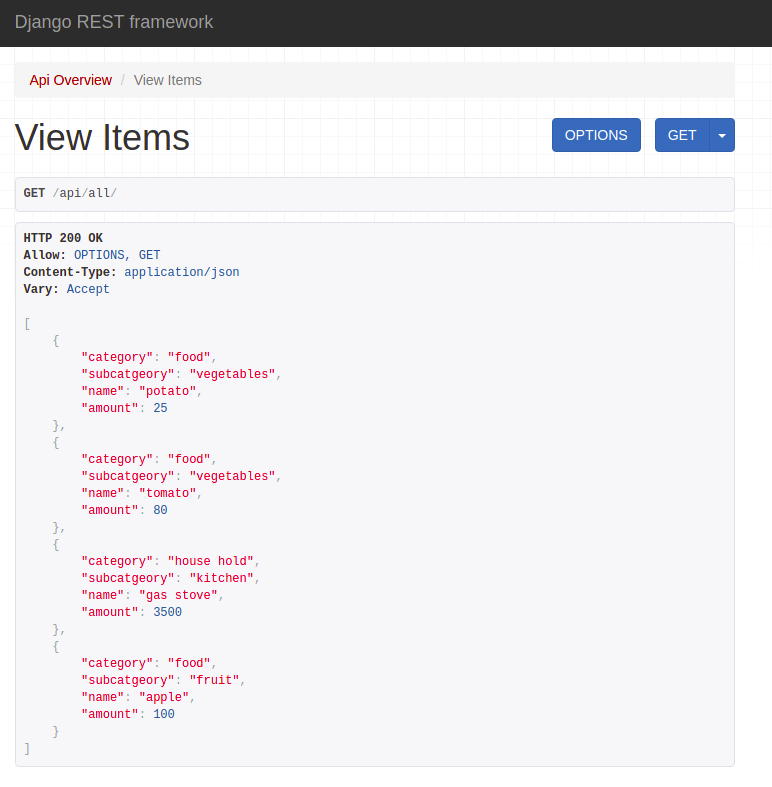
To retrieve records from the database, create a view that handles GET requests. The view_items function returns all items by default and also supports filtering results based on category, subcategory, or item name.
In views.py
In urls.py
Now visit http://127.0.0.1:8000/api/all/
👁 Django Rest Framework - List View
Note: In addition to retrieving all records, the endpoint allows users to filter results by category or subcategory and search for specific items by name using query parameters.
If we visit http://127.0.0.1:8000/api/all/?category=food our search result will narrow down to:
👁 Django Rest Framework - List View filter search result
To modify existing records, create an update endpoint that identifies an item using its primary key and updates the submitted data. Add the following update_items function to views.py:
In views.py
In urls.py
Now head to http://127.0.0.1:8000/api/all/?name=potato
👁 Django rest framework update view
To remove records from the database, create a view that handles DELETE requests. The delete_items function deletes a specific item identified by its primary key.
In views.py
In urls.py
Now visit http://127.0.0.1:8000/api/item/pk/delete/. See the below GIF for better understanding.
👁 Django Rest Framework - Delete View
The CRUD examples shown above uses open endpoints for simplicity. In real-world applications, APIs are often secured using authentication mechanisms such as Token Authentication or JWT Authentication.
Once authentication is enabled, clients must include a valid token in the request headers.
Example: Fetching Student Records with Token Authentication
Output
[
{
"id": 1,
"name": "Mike",
"roll": 101,
"city": "New York"
}
]
Explanation:
Note: This tutorial focuses on implementing CRUD operations with Django REST Framework. To learn how to secure your API endpoints using token-based authentication, refer to the article Implement Token Authentication using Django REST Framework.