 |
VOOZH | about |
|
VOOZH | about |
We will explore how to implement CRUD operations with FastAPI. CRUD operations are essential in any web application, including creating new records, retrieving existing records, updating existing records, and deleting records from a database.
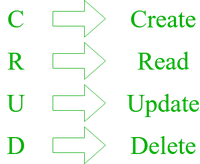
CRUD refers to the basic operations that can be performed on data in a database. It stands for Create, Read, Update, and Delete, and it represents the fundamental functionalities that are essential for managing data in most applications.
Create: It involves adding new data to the database. In FastAPI, we can create data by sending a POST request to the appropriate endpoint. For example, to add a new entry to the database, we would send a POST request to the creation endpoint with the relevant details in the request body.
Read: It involves retrieving existing data from the database. In FastAPI, we can perform Read operations using GET requests. For example, if we want to retrieve any entry from a database, we would send a GET request to the respective endpoint.
Update: It involves updating existing data in the database. In FastAPI we can perform an Update operation using PUT/PATCH, PUT allows us to update the entire database whereas PATCH allows us to modify specific fields in the database. For example, if we want to update any attribute of the user we would send a PUT/PATCH request to the endpoint with new details.
Delete: It involves deleting existing data from the database. In FastAPI we can perform a Delete Operation using DELETE requests. For example, if we want to delete any entry of a user we would send a DELETE request to the endpoint.
To implement the CRUD operations in FastAPI we need the following :
Step 1: Make sure your system has Python installed if not follow this article.
Step 2: Install FastAPI, Uvicorn and SQLalchemy using following command.
pip install fastapi uvicorn sqlalchemyStep 3: Create new file, name main.py
main.py: This code creates a FastAPI web app with SQLAlchemy for CRUD operations on an "items" table in a SQLite database. It provides four endpoints for Create, Read,Update, and Delete operations. The app can be run using uvicorn.
To run the application using uvicorn use the command:
uvicorn test:app Output:
Now let's start with testing of our API using SwaggerUI. Open new tab in your browser and type http://127.0.0.1:8000/docs
👁 Screenshot-(263)
POST Request
Click on POST which will allows us to add items, then click on 'Try it out' top right corner. In request body enter data then click on execute.
GET Request:
On the same page goto GET to retrieve data, then click of 'Try it out'. Then click on execute, below in server response you will get all retrieved data. We can also check our users from our 1st tab i.e http://127.0.0.1:8000/items/1. If no changes are reflected try to reload the tab.
PUT Request:
To update your existing user details go to PUT then, enter the index of user present in the list and update details in request body. To check if again use GET method or just go to your path.
DELETE Request:
To delete your existing user, go to DELETE then, enter the index of user present in the list and click execute. Again check if user got deleted or not. You can also in Reponse Body where you will get message like "Item deleted successfully"
Therefore now we can conclude that we can perform CRUD operations using FastAPI which is micro-web-framerwork of python for API development with SQLalchemy for database in which we used Uvicorn for running the API and SwaggerUI for testing our API.

.png)
-768.png)
.png)
.png)
.png)
.png)