|
VOOZH | about |
|
VOOZH | about |
The {{ form.as_table }} method renders Django form fields as HTML table rows. Each form field is displayed inside a <tr> element, with labels and input fields arranged in separate table cells. This rendering style is useful when displaying form data in a tabular layout without manually writing HTML for each field.
Example:
<form method="post">
{% csrf_token %}
<table>
{{ form.as_table }}
</table>
</form>
Example: Create a project named geeksforgeeks with an app named geeks and create a sample Django Form to render it.
In geeks /forms.py
In views.py,
In templates /home.html,
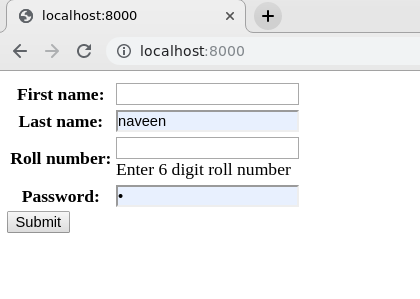
Open http://localhost:8000/:👁 Image
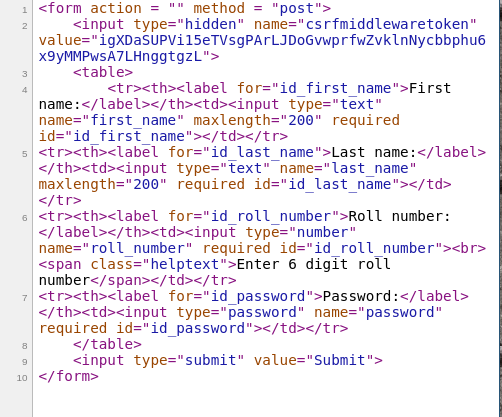
Let's check the source code whether the form is rendered as a table or not. By rendering as a table it is meant that all input fields will be enclosed in <tr> tags. Here is the demonstration, 👁 Image
Explanation:
Note: {{ form.as_table }} only controls how form fields are rendered in the template. It does not affect form validation, submission handling, or database operations.
| Method | Output |
|---|---|
{{ form.as_table }} | Renders fields inside <tr> tags |
{{ form.as_p }} | Renders fields inside <p> tags |
{{ form.as_ul }} | Renders fields inside <li> tags |
How to Create a Basic Project using MVT in Django?
How to Create an App in Django ?
{{ form.as_p }}
{{ form.as_ul }}