|
VOOZH | about |
|
VOOZH | about |
NumPy arrays are used to handle large datasets efficiently. When working with 2D arrays, you may need to access specific columns for analysis or processing. NumPy makes this easy with simple indexing methods.
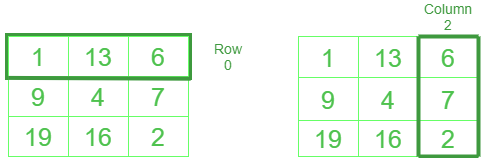
Given array: 1 13 6
9 4 7
19 16 2
Input: print(NumPy_array_name[:, 2])
Output: [6 7 2]
Explanation: printing 3rd column
Let's explore different ways to access 'i th' column of a 2D array in Python.
Slicing is the easiest and fastest way to access a specific column in a NumPy 2D array using arr[:, column_index], where : selects all rows and column_index picks the desired column.
Syntax:
NumPy_array_name[ : ,column]
[6 7 2]
Explanation:
Transpose the given array using the .T property and pass the index as a slicing index to print the array.
[6 7 2]
Explanation:
Here, we access the ith element of the row and append it to a list using the list comprehension and printed the col.
Output:
[13, 4, 16]Explanation:
Ellipsis (...) lets you select rows or columns without writing full slices. It’s useful for accessing data in multi-dimensional arrays.
Syntax:
numpy_Array_name[...,column]
[ 1 9 19]
Explanation:b[..., 0] prints the first column (index 0) of the array using ellipsis (...) to select all rows.
Related Articles: