|
VOOZH | about |
|
VOOZH | about |
Logarithmic axes help visualize data that spans several orders of magnitude by scaling the axes logarithmically instead of linearly. In Matplotlib, you can easily set logarithmic scales for the x-axis, y-axis, or both using simple methods. Let’s explore straightforward ways to apply logarithmic scales in Matplotlib.
This is the most straightforward methods to set logarithmic scales on the x-axis and y-axis. You first create a plot normally and then explicitly convert each axis to a log scale.
Output:
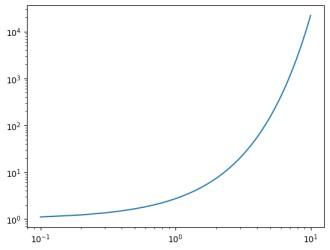
Explanation: x is a linear space array, y is exponential values. The plot is initially linear, but then both axes are changed to logarithmic scales using plt.xscale and plt.yscale, which helps visualize data spanning multiple orders of magnitude.
This method is the object-oriented equivalent of the first and provides more flexibility when working with multiple subplots or complex figures. Instead of using the pyplot state-machine interface, you use the Axes object to set the scale.
Output
Explanation: fig, ax = plt.subplots() creates a figure and axes for plotting. ax.plot(x, y) plots the data as a line graph. ax.set_xscale('log') and ax.set_yscale('log') change the x and y axes to logarithmic scales.
This method combines plotting and setting both axes to a logarithmic scale in one step. It’s a very concise way to generate plots where both x and y axes are logarithmic.
Output
Explanation: plt.loglog(x, y) creates a plot with both x and y axes set to logarithmic scales in one step, plotting the data as a line graph. plt.show() displays the plot.
If only one axis requires logarithmic scaling, these functions are ideal. semilogx applies log scale on the x-axis, while semilogy applies it on the y-axis.
Output:
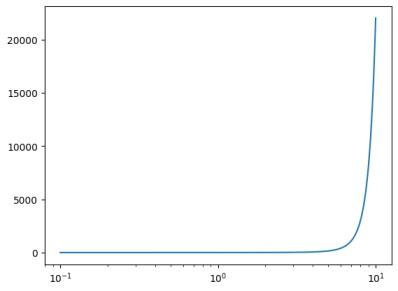
Explanation: plt.semilogx(x, y) plots the data with the x-axis on a logarithmic scale while keeping the y-axis linear. plt.show() displays the resulting plot.