|
VOOZH | about |
|
VOOZH | about |
Python comes with a lot of useful packages such as pandas, matplotlib, numpy, etc. To use DataFrame, we need a Pandas library and to plot columns of a DataFrame, we require matplotlib. Pandas has a tight integration with Matplotlib. You can plot data directly from your DataFrame using the plot() method. To plot multiple data columns in the single frame we simply have to pass the list of columns to the y argument of the plot function.
In this article, we will see how we can plot multiple data columns in a DataFrame.
Below are the ways by which we can plot multiple data columns in a Pandas DataFrame in Python:
In this example, a pandas DataFrame is created from a list of city data, and a bar plot is generated using Matplotlib to visualize both the population and the year 2020 for each city. The resulting plot displays unstacked bars with city names on the x-axis and population, and the year on the y-axis.
Output:
In this example, a pandas DataFrame is created from city data, and a stacked bar plot is generated using Matplotlib to visually compare the population and the year 2020 for each city. The 'stacked=True' parameter combines the bars for population and year in a stacked manner.
Output:
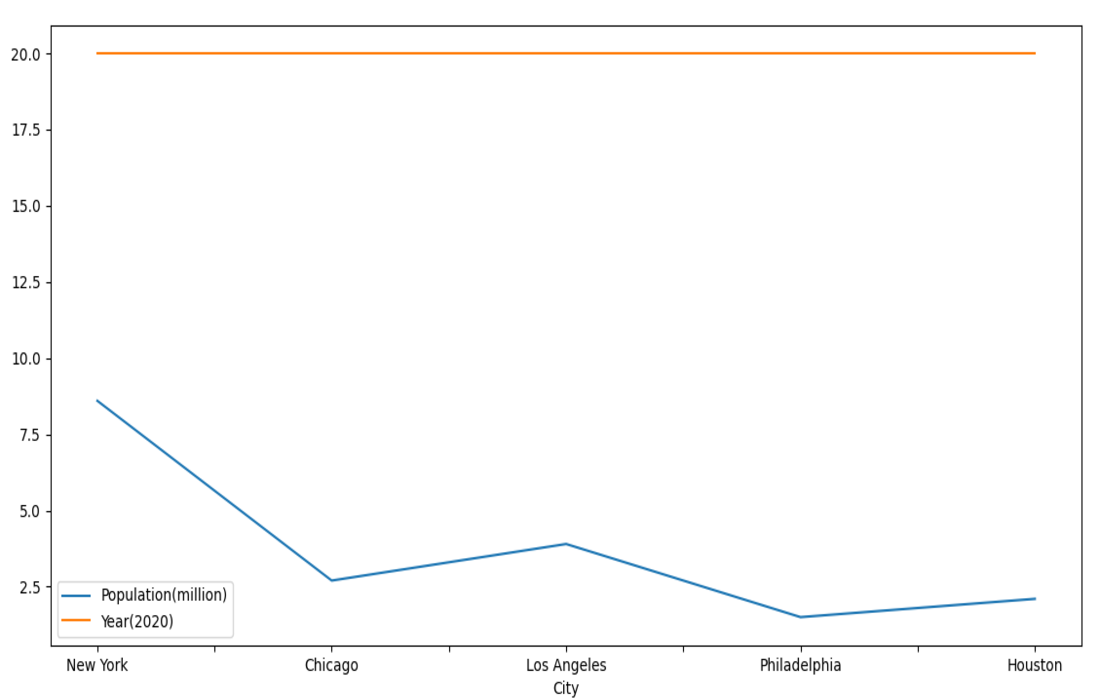
In this example, a pandas DataFrame is created from city data, and a line plot is generated using Matplotlib to visualize trends in both population and the year 2020 for each city. The resulting plot displays lines connecting data points for each city along the specified columns. The 'kind="line"' parameter specifies the type of plot, and 'mp.show()' displays the plot.


-660.png)