|
VOOZH | about |
|
VOOZH | about |
Prerequisites: Numpy
In this article, let's see how to generate a Python Script that randomly inserts Nan into a matrix using Numpy. Given below are 3 methods to do the same:
ravel() function returns contiguous flattened array(1D array with all the input-array elements and with the same type as it). A copy is made only if needed.
Syntax :
numpy.ravel(array, order = 'C')
Approach:
Example 1:
Output:
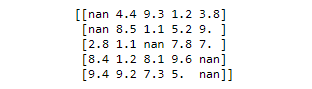
👁 ImageExample 2: Adding nan to but using randint function to create data. For using np.nan in randint function we must first convert the data into float as np.nan is of float type.
Output:
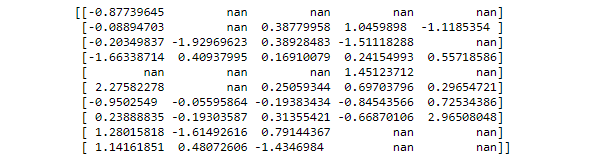
👁 ImageCreating a mask of boolean and applying that mask to the dataset can be one approach to produce the required result.
Approach:
Example :
Output:
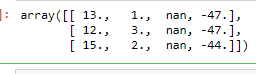
👁 ImageUsing insert() function will convert a whole row or a whole column to NaN. This function inserts values along the mentioned axis before the given indices.
Syntax :
numpy.insert(array, object, values, axis = None)
Approach:
Example: