|
VOOZH | about |
|
VOOZH | about |
In web automation and testing, maintaining session information across different runs of scripts is often necessary. Cookies are a great way to save session data to avoid logging in repeatedly. Selenium, a popular tool for web testing, provides straightforward ways to save and load cookies using Python.
In this article, we will learn all the steps to handle cookies efficiently in Selenium.
A cookie is a small piece of data that is sent from a website/server and stored on our computer. Cookies are mostly used to recognize the user and load the stored information. We can add, delete, and read cookies, which makes it convenient to manage sessions.
In order to maintain the session details, we can write cookies into a file. This comes in handy when it becomes necessary to carry on with a session without signing back in.
The following code snippet saves cookies to a file after logging into a website:
Output: We get a cookies.pkl file in the current working directory. This file contains the saved cookies in binary format.
cookies.pklTo resume a session, we can load cookies from a file and add them back to the browser using Selenium.
The following code snippet loads cookies from a file and uses them to restore the session:
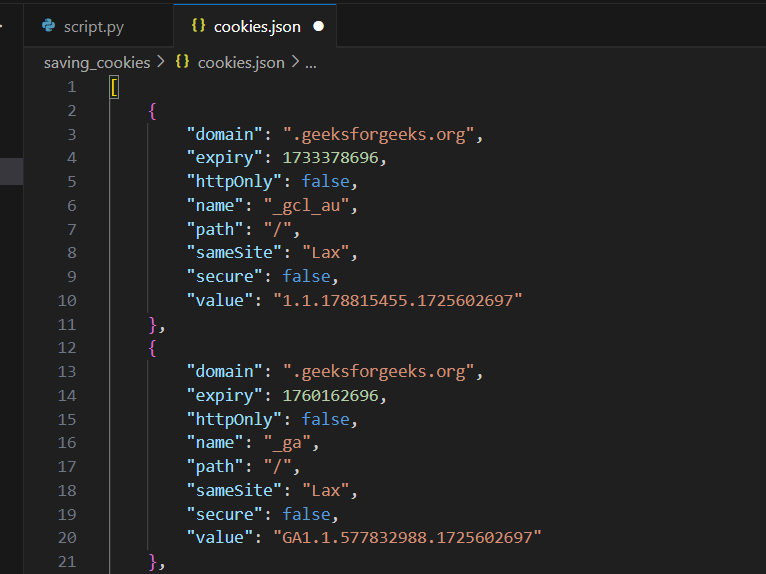
cookies.pkl file and load the cookies into the browser using driver.add_cookie().cookies.jsonInstead of using pickle, we can use Python's json module to save the cookies in a human-readable cookies.json file.
Output:
cookies.jsonWe can usejson.load() to read the cookies from the cookies.json file and load them into the browser as before.
To load cookies from a cookies.json file, use the following code:
The strategy comprising Storage as well as Load cookies in Selenium using Python is simple but it is a very powerful technique for managing sessions during web tests. If cookies are kept persistently one will not have to log in again and again because all the automation will be easy. This method suits particularly those test scripts which have to preserve a session state after many executions.