|
VOOZH | about |
|
VOOZH | about |
Image recognition is a task where a model identifies objects in an image and assigns labels to them. For example a model can be trained to identify difference between different types of flowers, animals or traffic signs. In this article, we will use Tensorflowand Keras to build a simple image recognition model.
Lets see various steps involved in its implementation:
Here we will be using Matplotlib, NumPy, TensorFlow, Keras and PIL libraries.
We will be using flower dataset which contains 3,670 images with five classes labeled as daisy, dandelion, roses, sunflowers and tulips. Here, pathlib library is used to handle the path names of the downloaded image file.
Output:
Now after downloading it, we can count total images by using len() method. Here glob() method is used to find jpg files in the specified directory.
Output:
Total images found: 3670Lets see some sample rose image from the dataset. Here we will find and list all files inside roses folder in the dataset directory.
Output:
Working with images we need to load the images using tf.keras.utils.image_dataset_from_directory function. We will split the dataset into 80% training and 20% validation datasets.
Training Split: Data on which the model trains on.
Output:
Found 3670 files belonging to 5 classes.
Using 2936 files for training.
Validation Split: Data on which the model gets validated.
Output:
Found 3670 files belonging to 5 classes.
Using 734 files for validation.
We can check class names by calling the class_names function on the training dataset in alphabetical order.
Output:
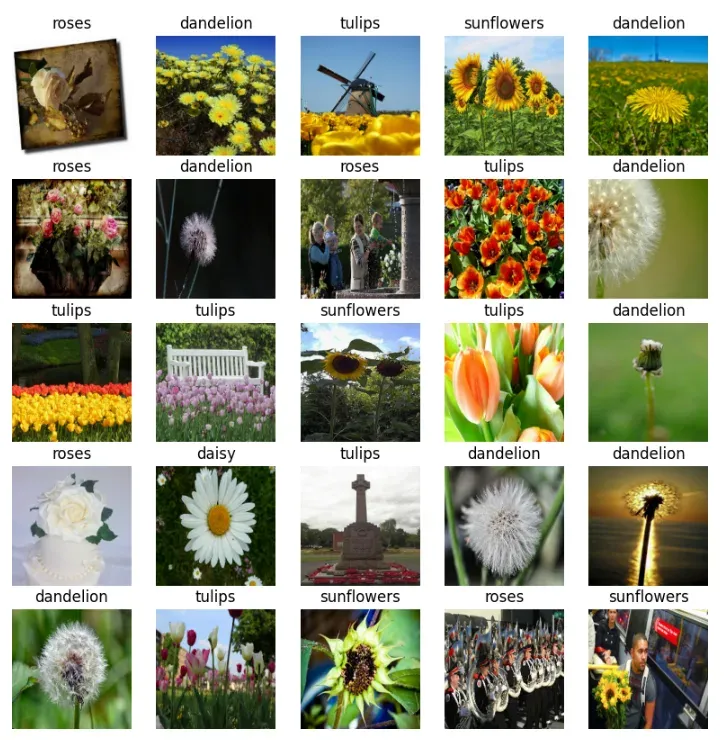
['daisy', 'dandelion', 'roses', 'sunflowers', 'tulips']Before training the model let’s visualize some images from the training dataset using matplotlib. This will help us understand how the dataset looks. We can view 25 images from training dataset.
Output:
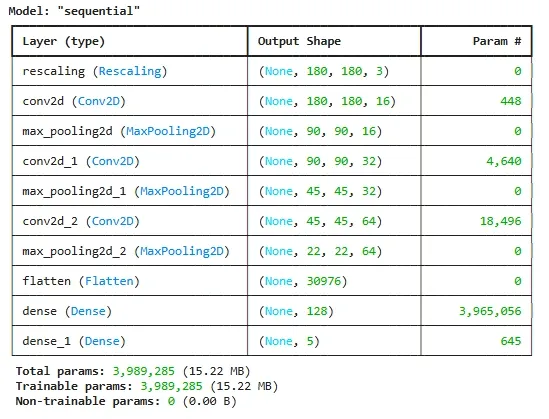
Here we design CNN (Convolutional Neural Network) model using Keras Sequential() model which is commonly used model. We will use three convolution layers with Conv2D and MaxPooling2D followed by a dense layer to classify images.
Now we compile model with the Adam optimizer and sparse categorical cross-entropy loss function. This allows us to evaluate performance of the model in terms of accuracy.
Output:
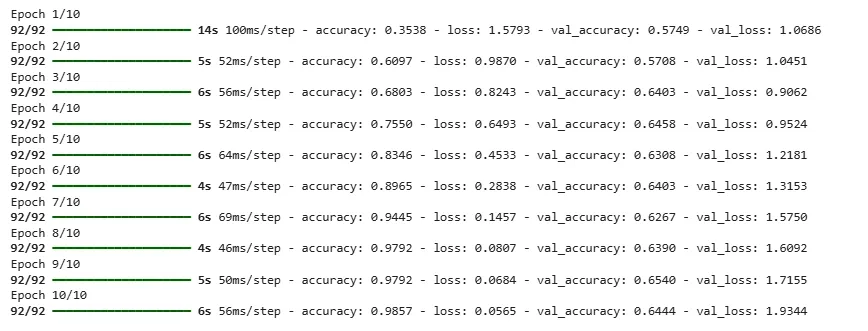
We can now train model using the model.fit() function. We will use the training and validation datasets and train model for 10 epochs.
Output :
With each epoch, accuracy is changed.
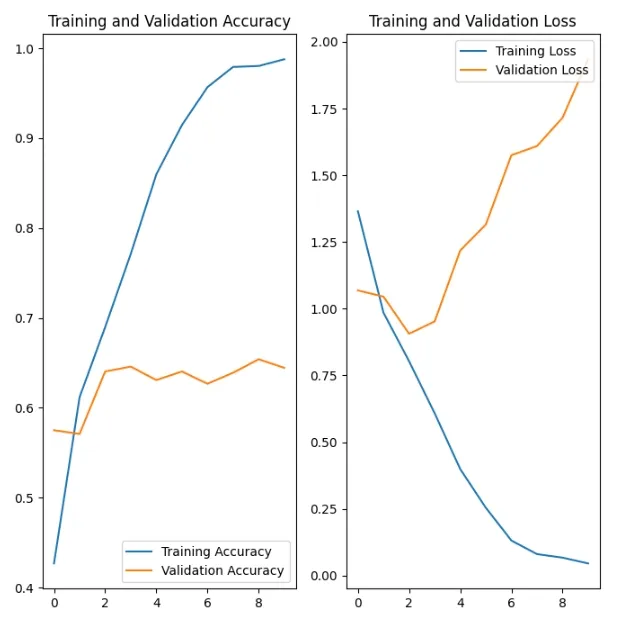
Creating plots of accuracy and loss on the training and validation sets to consider bias and variance.
Output :
By following these steps, we’ve learned how to classify images into categories easily. With this we can understand the important concepts of image recognition.