|
VOOZH | about |
|
VOOZH | about |
We will create a simple Joke application using Django. By using the pyjokes package, we’ll build a web app that generates and displays random jokes. We’ll go step-by-step to set up the project, configure the views, and render jokes dynamically on the homepage.
First, install Django and the pyjokes package using pip:
pip install django
pip install pyjokes
Prerequisites:
Create a new Django project:
django-admim startproject jokeapp
cd jokeapp
python manage.py startapp main
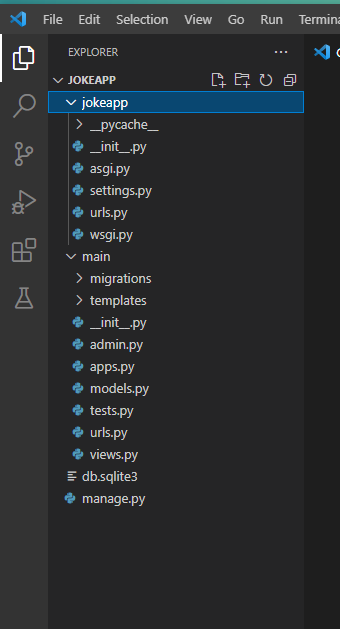
The directory structure should look like this :
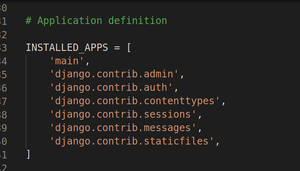
In jokeapp/settings.py, add the main app to the INSTALLED_APPS list:
Inside the main folder, create a new file urls.py:
main/urls.py:
Edit the jokeapp/urls.py to include the main app's URLs:
jokeapp/urls.py:
Edit the views.py file in the main app to get a joke from the pyjokes package:
main/views.py:
Create the folder structure for templates inside the main app:
main/templates/main/index.html
Inside the main/templates directory, create another directory called main, and inside that folder, create the index.html file.
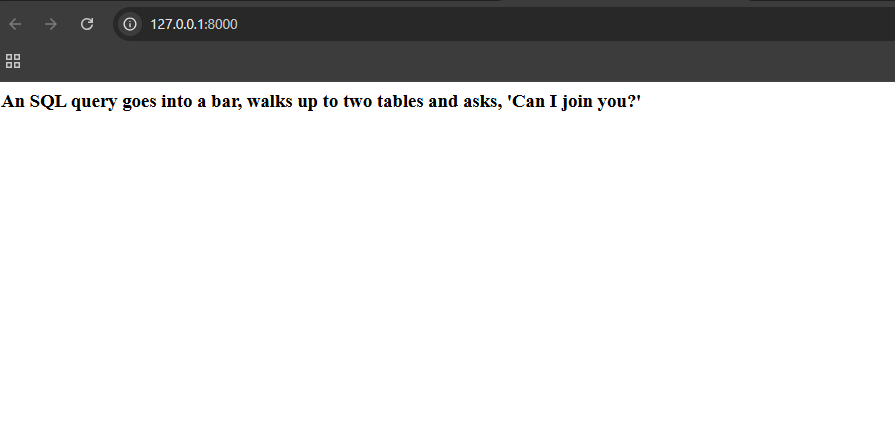
Once everything is set up, start the server again:
python manage.py runserver
Output