|
VOOZH | about |
|
VOOZH | about |
In web development, creating and consuming APIs (Application Programming Interfaces) is commonplace. Django Rest Framework (DRF) serves as a robust toolkit for building APIs in Django-based web applications. Within DRF, a pivotal concept is serializers. In this article, we will delve into the concept of nested serializers in Django and how they facilitate the handling of complex data relationships.
In many real-world scenarios, data models exhibit relationships with one another. For instance, you may have a Book model associated with a Category model through a foreign key. In such cases, merely serializing the Book object may not be sufficient; you might want to include the related Category information within the serialized output. This is precisely where nested serializers come into play.
Let's walk through a step-by-step implementation of nested serializers in Django to understand how they work in practice. Consider a scenario where we have two models, Category and Book, with each book belonging to a category. Our objective is to serialize a Book object along with its associated Category information.
To start the project use this command
django-admin startproject core
cd core
To start the app use this command
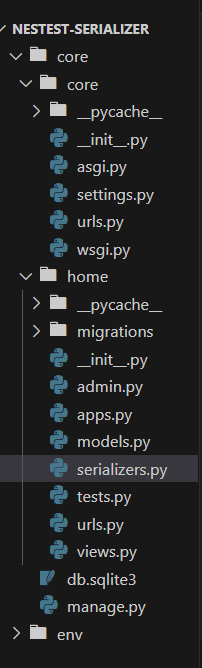
python manage.py startapp home
Now add this app and 'rest_framework' to the 'settings.py'
INSTALLED_APPS = [
 "django.contrib.admin",
 "django.contrib.auth",
 "django.contrib.contenttypes",
 "django.contrib.sessions",
 "django.contrib.messages",
 "django.contrib.staticfiles",
 "rest_framework",
 "home",
 "rest_framework.authtoken",

]
serializer.py: This Python code uses the Django REST framework to create two serializers: CategorySerializer and BookSerializer.
models.py: This Python code defines two Django models:
admin.py: First we register Category and then we register Book model.
views.py: Various Django and Django REST framework modules and classes are imported.A view function get_book is defined using the @api_view decorator, specifying that it handles HTTP GET requests.All Book objects are retrieved from the database using Book.objects.all().The retrieved Book objects are serialized using the BookSerializer.A JSON response is returned with a status code of 200 and the serialized book data as the payload.
core/urls.py: This is the urls.py file of our project folder in this urls.py file we import first all important library and after that we map the app with project using include function.
app/urls.py: In the urls.py file of the app we import the admin and also import the path and include method and also import the all functionality of views.py file . and then we create the path for performing the nestest serailizer operations
Run these commands to apply the migrations:
python3 manage.py makemigrations
python3 manage.py migrate
Run the server with the help of following command:
python3 manage.py runserverOutput
Conclusion :
In conclusion, nested serializers in Django provide a powerful mechanism for handling complex data relationships in API development. By incorporating related model serializers within primary serializers, developers can efficiently serialize and deserialize data hierarchies, delivering structured and informative API responses. Whether dealing with parent-child relationships, deep dependencies, or multi-level data structures, nested serializers enhance the flexibility and usability of Django-powered APIs, making them a valuable tool for creating rich and efficient web applications.