|
VOOZH | about |
|
VOOZH | about |
The numpy.multiply() is a numpy function in Python which is used to find element-wise multiplication of two arrays or scalar (single value). It returns the product of two input array element by element.
Syntax:
numpy.multiply(arr1, arr2, out=None, where=True, casting='same_kind', order='K', dtype=None, subok=True)
Parameters:
arr1 (array_like or scalar): First input array.arr2 (array_like or scalar): Second input array.dtype (optional): Desired type of the returned array. By default dtype of arr1 is used.out (optional, ndarray): A location where result is stored. If not provided a new array is created.where (optional, array_like): A condition to find where multiplication should happen. If True multiplication occurs at that position and if False value in output remains unchanged.Return: ndarray(Element-wise product of arr1 and arr2).
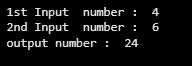
in_num1andin_num2 using multiply and stores the result in out_num.Output:
When one of the inputs is a scalar it is multiplied with each element of the array. This operation is commonly used for scaling or adjusting values in an array. Here Scalar value 5 is multiplied with each element 1,2,3.
Output:
[ 5 10 15]
When both inputs are arrays of the same shape numpy.multiply() multiplies corresponding elements together. This operation is performed element by element.
Output
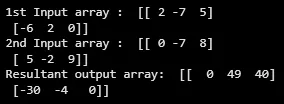
In above example corresponding elements from in_arr1 and in_arr2 are multiplied:
numpy.multiply() supports broadcasting which means it can multiply arrays with different shapes as long as they are compatible for broadcasting rules.
Output:
In this example in_arr1 is broadcasted to match the shape of in_arr2 for element-wise multiplication.
To understand broadcasting you can refer to this article:NumPy Array Broadcasting
out ParameterWe can specify an output array where result of the multiplication will be stored. This avoids creating a new array and can help save memory when working with large datasets.
Output:
[ 4 10 18]
Result of element-wise multiplication is stored in output_arr instead of creating a new array. By mastering numpy.multiply() we can efficiently handle element-wise multiplication across arrays and scalars.