|
VOOZH | about |
|
VOOZH | about |
Prerequisites : Matplotlib Introduction
In this article, we will be discussing how to plot a Gantt Chart in Python using Matplotlib.
A Gantt chart is a graphical depiction of a project schedule or task schedule (In OS). It's is a type of bar chart that shows the start and finish dates of several elements of a project that include resources or deadline. The first Gantt chart was devised in the mid-1890s by Karol Adamiecki, a Polish engineer who ran a steelworks in southern Poland and had become interested in management ideas and techniques. Some 15 years after Adamiecki, Henry Gantt, an American engineer, and project management consultant, devised his own version of the chart which became famous as "Gantt Charts".
Some Uses of Gantt Charts :
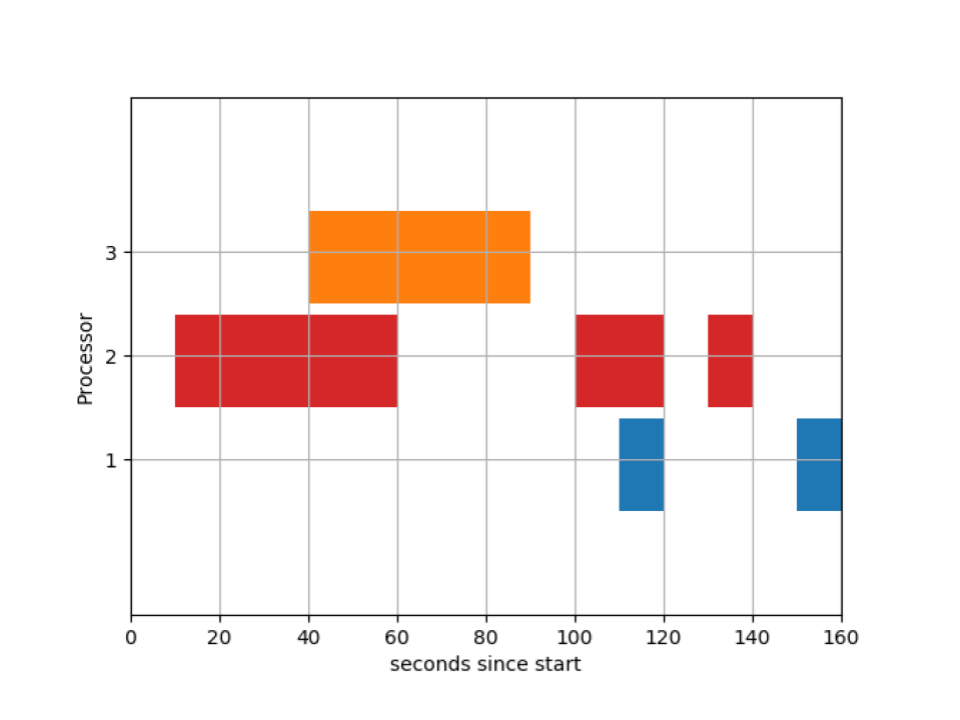
A sample Gantt Chart for task scheduling is shown below:
We will be using broken_barh types of graph available in matplotlib to draw gantt charts.
Below is the code for generating the above gantt chart :
Lets's understand the different pieces of codes one by one :
fig, gnt = plt.subplots()
gnt.set_ylim(0, 50)
gnt.set_xlim(0, 160)
gnt.set_xlabel('seconds since start')
gnt.set_ylabel('Processor')gnt.set_yticks([15, 25, 35]) gnt.set_yticklabels(['1', '2', '3'])
gnt.grid(True)
gnt.broken_barh([(40, 50)], (30, 9), facecolors=('tab:orange'))gnt.broken_barh([(start_time, duration)],
(lower_yaxis, height),
facecolors=('tab:colours'))gnt.broken_barh([(10, 50), (100, 20), (130, 10)], (20, 9),
facecolors=('tab:red'))plt.savefig("gantt1.png")
Reference : Broken Barh Example Matplotlib Documentation