|
VOOZH | about |
|
VOOZH | about |
Testing is an integral part of software development, ensuring the reliability and functionality of applications. Python Falcon is a lightweight web framework for building APIs rapidly. In this article, we will explore how to test Python Falcon APIs using two popular testing frameworks: unittest and pytest. Each approach offers its advantages, and we will provide step-by-step instructions for setting up tests using both frameworks.
Below are step-by-step approaches to performing testing in Python Falcon using unittest in Python:
We will create the virtual environment by using the following commands:
python -m venv venv
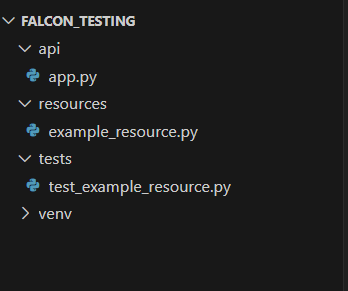
venv\Scripts\activate👁 Screenshot-2024-03-17-180947
In this step, we will install the required libraries by using the following command:
pip install falconapi/app.py
In this code, a Falcon API is created, with a route '/example' mapped to an instance of the ExampleResource class, which handles incoming requests and responses for that route. Falcon is a Python web framework for building fast APIs, and the code structure follows the convention of setting up routes and resources within the API instance.
resources/example_resource.py
In this code, a Falcon resource class named ExampleResource is defined, which handles GET requests by setting the response status to HTTP 200 and providing a body with the text 'Example GET Response'. Falcon is a Python web framework used for building APIs, and the on_get method is a Falcon convention for handling GET requests.
tests/test_example_resource.py
In this code, a unit test case named TestExampleResource is defined using the unittest module. The setUp method creates a Falcon test client for the API defined in the app module. The test_get_example method tests the GET request to the '/example' route, ensuring that it returns a status code of 200 and the expected response body text 'Example GET Response'. Finally, if the script is run directly, the unittest.main() function is called to execute the test case. This setup allows for automated testing of the Falcon API endpoints.
Run the test by using the following command:
python -m unittest tests.test_example_resourceOutput:
(venv) PS F:\GeeksforGeeks\Falcon_Testing> python -m unittest tests.test_example_resource
F:\GeeksforGeeks\Falcon_Testing\tests\test_example_resource.py:21: DeprecatedWarning:
Call to deprecated function __init__(...). API class may be removed in a future release, use falcon.App instead.
 from app import api

----------------------------------------------------------------------
Ran 0 tests in 0.004s

OKBelow are the step-by-step approach for Python Falcon Testing using Pytest in Python:
We will create the virtual environment by using the following commands:
python -m venv venv
venv\Scripts\activate
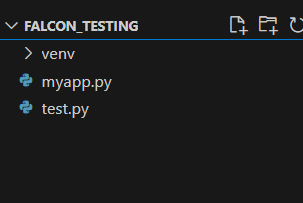
👁 Screenshot-2024-03-17-190102
We will follow all the steps as done in unittest with file structure and all things similarly. But we have to change only the test_example_resource.py code and we will write Pytest code.
myapp.py
In this code, a Falcon application is created with a single resource, HelloWorldResource, which handles GET requests to the root URL ('/'). When the application is run directly, it is served using Waitress on host 0.0.0.0 and port 8000, allowing it to listen for incoming HTTP requests and respond with a JSON message "Hello, World!" upon receiving a GET request to the root URL. The application architecture follows Falcon's convention of defining resources and routes within an application instance.
test.py
In this code, a unit test module is created to test the functionality of the myapp.py module. A fixture named test_client is defined to provide a Falcon test client initialized with the application created by myapp.create_app(). The test_get_message function verifies that a GET request to the root URL ('/') returns the expected JSON response, ensuring the HelloWorldResource correctly handles the request and provides the message "Hello, World!". This setup allows for automated testing of the Falcon application's behavior.
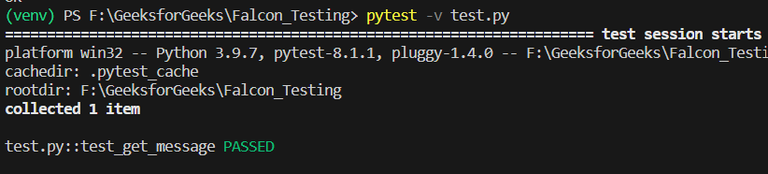
Run this program using the following command:
pytest -v test.py
Output: