Python is a great language for doing data analysis, primarily because of the fantastic ecosystem of data-centric Python packages.
Pandas is one of those packages and makes importing and analyzing data much easier.
Pandas provide a method to split string around a passed separator or delimiter. After that, the string can be stored as a list in a series or can also be used to create multiple column data frame from a single separated string.
rsplit() works in a similar way like the
.split() method but
rsplit() starts splitting from the right side. This function is also useful when the separator/delimiter occurs more than once.
.str has to be prefixed everytime before calling this method to differentiate it from the Python’s default function otherwise, it will give an error.
Syntax:
Series.str.rsplit(pat=None, n=-1, expand=False)
Parameters:
pat: String value, separator or delimiter to separate string at.
n: Numbers of max separations to make in a single string, default is -1 which means all.
expand: Boolean value, returns a data frame with different value in different columns if True. Else it returns a series with list of strings
Return type: Series of list or Data frame depending on expand Parameter
To download the Csv file used, click
here.
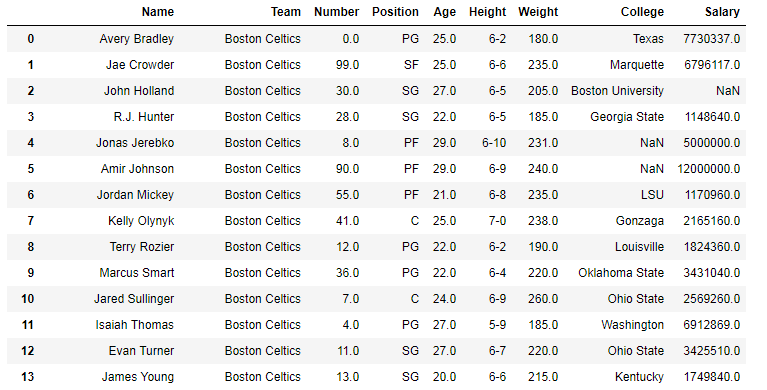
In the following examples, the data frame used contains data on some NBA players. The image of data frame before any operations is attached below.
👁 Image
Example #1: Splitting string from right side into list
In this example, the string in the Team column is split at every occurrence of "t". n parameter is kept 1, hence the max number of splits in the same string is 1. Since rsplit() is used, the string will be separated from the right side.
Output:
As shown in the output image, the string was splitted at the "t" in "Celtics" and at the "t" in "Boston". This is because the separation happened in reverse order. Since the expand parameter was kept False, a list was returned.
👁 Image
Example #2: Making separate columns from string using .rsplit()
In this example, the Name column is separated at space (” “), and the expand parameter is set to True, which means it will return a data frame with all separated strings in a different column. The Data frame is then used to create new columns and the old Name column is dropped using .drop() method.
n parameter is kept 1, since there can be middle names (More than one white space in string) too. In this case rsplit() is useful as it counts from the right side and hence the middle name string will be included in the first name column because max number of separations is kept 1.