|
VOOZH | about |
|
VOOZH | about |
JSON stands for JavaScript Object Notation. It is a format for structuring data. This format is used by different web applications to communicate with each other. In this article, we will learn about JSON pretty print
JSON (JavaScript Object Notation) is a text-based data format that is interchangeable with many programming languages. It is commonly used for data transmission between client-server applications. Usually, minified versions of JSON text are transmitted to save bandwidth. However, for debugging and analysis, a beautified version or a pretty print JSON is required. Essentially, pretty print JSON means having proper indentation, white spaces, and separators.
Example:
Input:
'[ {"studentid": 1, "name": "ABC", "subjects": ["Python", "Data Structures"]}]'

Output:
[
 {
 "studentid": 1,
 "name": "ABC",
 "subjects":
 [
 "Python",
 "Data Structures"
 ]
 }
]
First, use json.loads() method to convert JSON String to Python object. To convert this object to a pretty print JSON string, the json.dumps() method is used. Below are examples and steps to better understand these cases.
Syntax: json.dumps(obj, indent,separator)
Parameter:
- obj: Serialize obj as a JSON formatted stream
- indent: If indent is a non-negative integer or string, then JSON array elements and object members will be pretty-printed with that indent level. An indent level of 0, negative, or "" will only insert newlines.
- separators : If specified, separators should be an (item_separator, key_separator) tuple.
This method has the parameter indent to specify the number of spaces and a separator parameter to specify the separator between key and value. By default, the separator is a comma between key-value pairs and a colon between key and value. If the indent parameter of json.dumps() is negative, 0, or an empty string then there are no indentations and only newlines are inserted. By default, the indent is None and the data is represented in a single line.
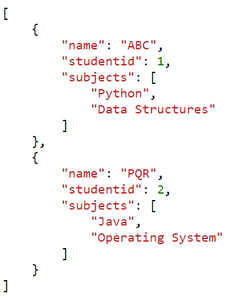
The code takes a JSON string containing student records, parses it into a Python data structure, then pretty-prints the JSON data with proper indentation for improved readability.
Output:
[
 {
 "studentid": 1,
 "name": "ABC",
 "subjects": [
 "Python",
 "Data Structures"
 ]
 },
 {
 "studentid": 2,
 "name": "PQR",
 "subjects": [
 "Java",
 "Operating System"
 ]
 }
]
The code takes a JSON string containing student records, parses it into a Python data structure, and then pretty-prints the JSON data with zero indentation, making it compact and less readable.
Output:
[
{
"studentid": 1,
"name": "ABC",
"subjects": [
"Python",
"Data Structures"
]
},
{
"studentid": 2,
"name": "PQR",
"subjects": [
"Java",
"Operating System"
]
}
]
To write a Python object as JSON Pretty Print format data into a file, json.dump() method is used. Like json.dumps() method, it has the indents and separator parameters to write beautified JSON.
Output:
To read JSON from a file or URL, use json.load(). Then use json.dumps() to convert the object (obtained from reading the file) into a pretty print JSON string.
Output:
[
 {
 "studentid": 1,
 "name": "ABC",
 "subjects": [
 "Python",
 "Data Structures"
 ]
 },
 {
 "studentid": 2,
 "name": "PQR",
 "subjects": [
 "Java",
 "Operating System"
 ]
 }
]
This code reads JSON data from a file called "test.json," parses it into a Python data structure, and then prints it using both the built-in print function and the pprint module. The pprint module is used to pretty-print the JSON data with specific formatting options like an indentation of 2, a line width of 30 characters, and compact representation.
Output:
{'Teacher_id': 1, 'name': 'Suraj', 'Salary': 50000, 'attendance': 80,
'Branch': ['English', 'Geometry', 'Physics', 'World History'], 'email': 'test@example.com'}
Pretty Printing using pprint module
("{'Teacher_id': 1, 'name': "
 "'Suraj', 'Salary': 50000, "
 "'attendance': 80, "
 "'Branch': ['English', "
 "'Geometry', 'Physics', "
 "'World History'], 'email': "
 "'test@example.com'}")
In this example, we are trying to print data using the command line. To validate and pretty-print JSON objects from the command line, Python offers the json.tool package.
Output:
{
 "studentid": 1,
 "name": "ABC",
 "subjects": [
 "Python",
 "Data Structures"
 ]
}