|
VOOZH | about |
|
VOOZH | about |
The connection to a PostgreSQL database instance is managed by the connection class. It's more like a container for a database session. The function connect() is used to create connections to the database. The connect() function starts a new database session and returns a connection class instance. We can construct a new cursor to perform any SQL statements by putting the connection object to use.
Syntax:
psycopg2.connect(database="dbname", user='postgres', password=passwords, host=local_host, port= port_number)
parameters:
- dbname =the database name
- user =user name used to authenticate (widely used= postgres)
- password= password
- host =database host address
- port =connection port number (defaults = 5432 )
Example:
We import the psycopg package. conn is the connection variable that contains the connection for the "Classroom database", where the user is 'Postgres', the password is 'pass', the local host is '127.0.0.1' and the port number is '5432'.
Syntax:
cursor(name=None, cursor_factory=None, scrollable=None, withhold=False)
Parameters:
- name: by default "none", if the name is given a server-side cursor will be returned, if none is given a regular client-side server will be returned.
- cursor_factory: to create non-standard cursors
- scrollable: default None
- withhold: default False
Syntax:
connection.commit()
Syntax:
connection.rollback()
Syntax:
connection.close()
Example:
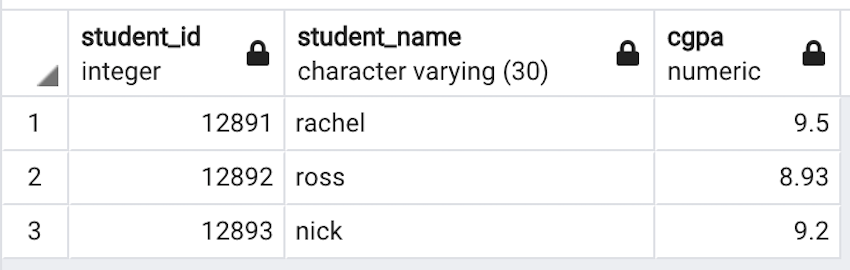
In the below example, The create table command is executed and values are inserted into the table using the insert SQL command. The changes are saved using the commit() method. Finally, the connection to the database is closed using the close() method.
Output:
Table successfully created
(12891, 'rachel', Decimal('9.5'))
(12892, 'ross', Decimal('8.93'))
(12893, 'nick', Decimal('9.2'))
👁 Image